About the Project |
Packages description |
How to Connect with Drone
Dependencies |
How to Run |
Troubleshooting |
Next features |
References
(For ROS2 packages, visit here)
This project has as objective to create a simple ROS Wrapper for the DJI Tello Edu drone, enabling the programmers to control the drone through ROS framework. The packages are based on a Python framework.
The current nodes provides a way to move the drone through topics and send commands as take-off and land as ROS actions.
Currently this only allows to control the drones individually, but one of the features to be developed is the control of a swarm.
On going project Beacon related code. On going project, so no much info about it :)
Action Clients for /tello_takeoff and /tello_land. More actions to be added in future implementations.
The main package, it generates the node that process commands and logs from Tello. More information about the wrapper package and how to run the node can be found here.
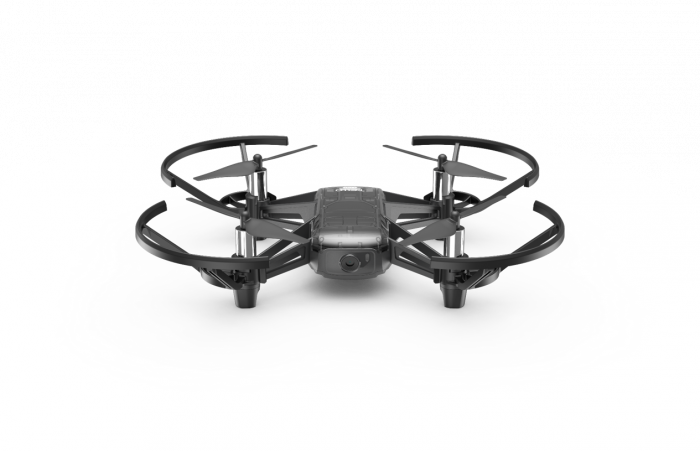
Package with the URDF model of the drone, that can be loaded in RVIZ or Gazebo. The drone model is in the image below. More information about how to run this model can be found here.
To connect the drone with the device where the ROS wrapper will run, just follow the next steps:
- Turn on the Drone
- Connect with the Drone wifi, with format TELLO-XXXXXX. The 6 digits code can be found on the back side of the drone
- Enjoy :)
Some python packages are needed to be able to run this wrapper. To install it, just use the following command
$ pip install opencv-python av
The first step after installing all the dependencies in the previous section is to clone the repository and build the packages.
First, download/clone this repository, then copy the packages inside the tello folder into the source of your ROS workspace.
If a ROS workspace created was not created yet, just run the following commands:
$ cd ~
$ mkdir -p ~/catkin_ws/src
Now paste the packages inside ~/catkin_ws/src. After that, use rosdep to install all the ROS dependencies.
$ cd ~/catkin_ws/
$ rosdep install --from-paths src --ignore-src -r -y
Now we can build.
$ cd ~/catkin_ws/
$ catkin_make
$ cd ~/catkin_ws/
$ source devel/setup.bash
$ rosrun tello_bridge tello_bridge_wrapper.py
After that, /tello_bridge_node is created. This node publishes all the telemetry data in the /tello_data topic. The structure of this topic can be found here.
This node also have a subscriber, named /cmd_vel, used to move the robot. you need to publish a Twist message, with the values of translation and rotation of the drone. The structure of a Twist message can be found here.
ROS Actions are used to take-off and land the drone. To take-off, open another terminal and run the command
$ source devel/setup.bash
$ rosrun tello_actions tello_takeoff_client
And to land
$ source devel/setup.bash
$ rosrun tello_actions tello_land_client
To open the URDF model of tello_description package you just need to open another terminal and run the following code:
$ source devel/setup.bash
$ roslaunch urdf_tutorial display.launch model:='$(find tello_description)/urdf/tello.urdf'
Battery may be too low Wifi may be disconnected
- Integrate decawave (see this branch)
- Node for the TF of the drone (see this branch)
- Perform unit tests in all nodes
- Create a config file for all user-defined parameters
- Create roslaunch files
- Action implementation for more commands
- Swarm integration
Subscribes: /cmd_vel
Publishes: /tello_data /tello_image
Actions /tello_land /tello_takeoff