

A bash script to get the weather and forecast from OpenWeatherMap and output to the terminal, Openbox, or HTML
Additionally, a way to put that information onto an image (see the weather_image subdirectory).
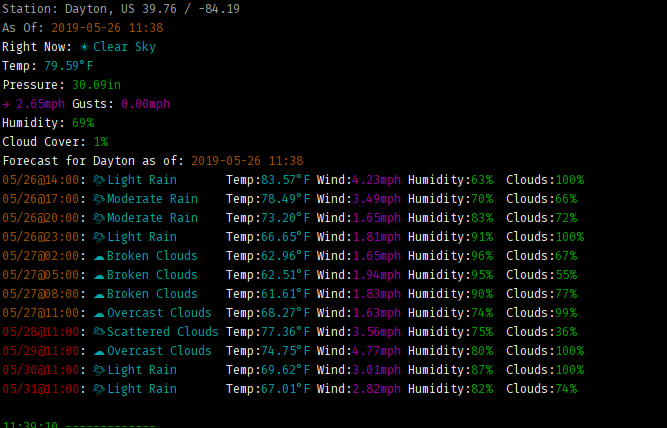
Weather report written in Bash.
weather.sh gets the current weather from
OpenWeatherMap and displays the
results to the terminal, HTML, or for an OpenBox pipe menu. It will
calculate (if appropriate) the "feel like" weather by calculating the
wind chill or heat index. A great deal of basis for this script comes
from BashWeather,
bash-weather,
and many more that I forgot to save the URLs of.
forecast.sh gets the forecast from OpenWeatherMap
and likewise displays the results. OpenWeatherMap forecasts are at three hour
intervals (0800, 1100, 1400, etc). It displays all forecasts for the next
twenty four hours, then displays the closest time forecast for the day after
that. For example, if it's 1136 (as I'm writing this) it shows all forecasts
through the 1100 forecast the next day, then the 1100 forecast for each
subsequent day. Options and .rc file are the same as for weather.sh.
If you wish to show both together, simply execute:
weather.sh && forecast.sh
This project is licensed under the MIT license. For the full license, see LICENSE.
- OpenWeatherMap API key (http://openweathermap.org/appid).
- Bash shell ≥ 4.2.
bcbasic calculator for floating point arithmetic. Can be found in thebcpackage on major Linux distributions.curlcommand-line tool for getting data using HTTP protocol. cURL can be found in thecurlpackage on major Linux distributions.grepcommand-line tool used for parsing downloaded XML data.grepcan be found in thegreppackage on major Linux distributions.jqcommand-line tool for parsing JSON data.jqcan be found in thejqpackage on major Linux distributions.trcommand-line tool for parsing JSON data.trcan be found in thetrpackage on major Linux distributions.awkcommand-line tool for parsing JSON data.awkcan be found in theawkpackage on major Linux distributions.
Optional: For colors in terminal, save bashcolors in this repository to
.bashcolors in your $HOME directory.
Run weather.sh or forecast.sh with the appropriate commandline switches
(below). If the current conditions do not qualify for the heat index or wind
chill, it is not displayed.
Copy (and edit, as appropriate) the weather_sh.rc file to $HOME\.config\weather_sh.rc.
- The first line is the OpenWeatherMap API key
- The second line is your default location. (See note below)
- The third line is your default degree character (either
corf) - The fourth line is True or False depending on whether or not you want icons displayed for the weather.
- The fifth line is whether to use
bashcolors.
weather.sh and forecast.sh can be started with the following command line
options:
-kSpecifies OpenWeatherMap API key from the command-line.-l city_nameSets the city for manual weather lookup. (see note below)-tOutput to the terminal/stdout (default if no output is specified)-hOutput HTML formatted text-oOutput OpenBox output-yOutput Conky format (no icons)-nTerminal output without icons-pSpecify cache/temp path with trailing slash-fUse imperial (farenheit, inches Hg, mph) units; default is metric-cUse colored output in the terminal if.bashcolorsis in the home dir. Note that if you want to alter the colors, you will have to manually alter the script.
Note: If the OpenWeatherMap API key is specified from the command-line, it will override the API key set in the file.
Note: It is STRONGLY recommended to use the City ID from OpenWeatherMap instead of a city name. Instructions on finding your city's City ID here .
I have a single line config for my secondary screen with the weather config in it:
Now: ${execi 300 weather.sh -y} Forecast: ${execi 300 forecast.sh -y}
The conky output is currently limited via code to just the next five outputs.
Please see the weather_image subdirectory.
- Add in sunrise/sunset
- HTML colored output
- Current location instead of hardcoded
- this is problematic due to the way the API looks up city names.