一款日志记录组件,能够通过注解优雅地记录日志
@LogRecord(success = "'用户'+#user.name+'执行了此次方法'", bizId = "1")
public void handle(User user) {
}

//日志输出【logId=663cf8f5-6a0c-4690-ad92-40fa21b37e5e, operateDate=Mon May 16 07:16:08 CST 2022, bizId=1, bizType=, operatorId=, success=true, templateMsg=用户小明执行了此次方法, exception=, extra=, executionTime=8】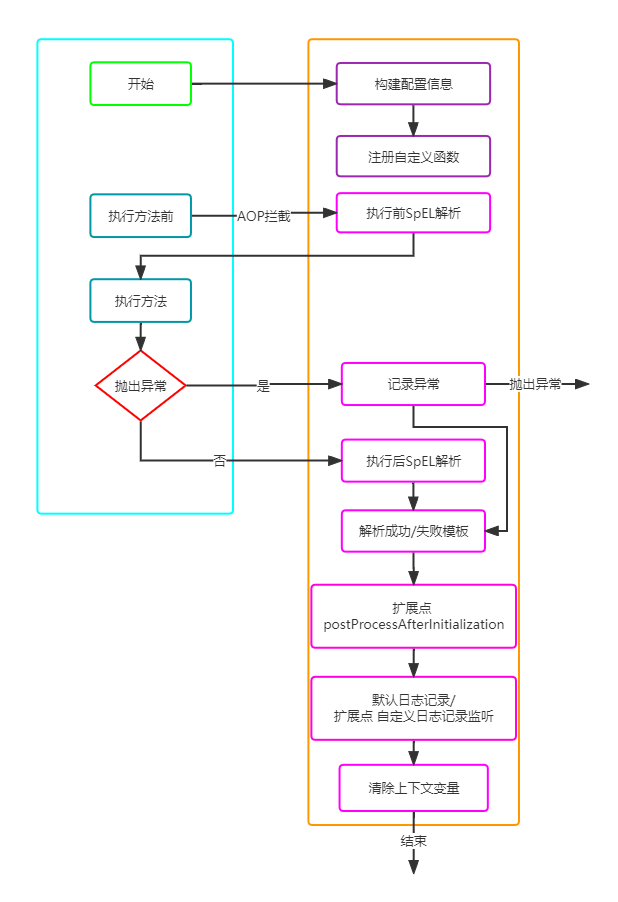
通过SpringBoot与自定义注解,来优雅地记录日志,实现日志对代码无侵入的效果。
日志注解
@Documented
@Target({ElementType.METHOD})
@Retention(RetentionPolicy.RUNTIME)
@Repeatable(LogRecords.class)
public @interface LogRecord {
    // 操作日志成功的文本模板
    String success();

    // 操作日志失败的文本模板
    String fail() default "";

    // 操作日志绑定的业务对象标识
    String bizId();

    // 操作日志绑定的业务对象类别
    String bizType() default "";

    // 操作日志的执行人Id
    String operatorId() default "";

    // 记录日志的条件
    String condition() default "";

    // 注解中参数的字符拼接选择
    int prefix() default 1;

    // 额外信息
    String extra() default "";

    // 是否在方法执行前对SpEL进行解析
    boolean executeBeforeFunc() default true;
}
自定义函数注解
/**
 * 仅支持静态方法
 */
@Target({ElementType.METHOD})
@Retention(RetentionPolicy.RUNTIME)
public @interface LogRecordFunction {
    // 自定义函数名, 默认为原method名
    String value() default "";
}- 通过SpringBoot、注解与SpEL解析,实现日志与业务代码的分离。
- 支持LogRecordContext手动传递键值对通过SpEL解析。
- 支持自定义函数通过SpEL解析。
- 支持自定义condition条件决定是否记录日志。
- 根据方法是否抛出异常,解析不同的文本模板。
- 支持方法执行前或方法执行后对SpEL进行解析。
- 支持重复注解。
- 实现线程池分发处理日志记录、支持自定义线程池配置。
- 扩展点:支持对日志信息进行修改与自定义日志记录。
在方法(方法所在类需要先被注入到Spring容器中)上打上注解@LogRecord,定义好操作日志成功的文本模板success与操作日志绑定的业务对象标识bizId后即可
@LogRecord会自动注册方法中的参数值并通过SpEL解析
@LogRecord(success = "'用户'+#user.name+'执行了此次方法'", bizId = "1")
public void handle(User user) {
}

//日志输出【logId=663cf8f5-6a0c-4690-ad92-40fa21b37e5e, operateDate=Mon May 16 07:16:08 CST 2022, bizId=1, bizType=, operatorId=, success=true, templateMsg=用户小明执行了此次方法, exception=, extra=, executionTime=8】通过LogRecordContext,可以手动向此次方法的操作日志上下文中添加键值对,以供SpEL解析使用
@LogRecord(success = "'用户'+#userName+'执行了此次方法'", bizId = "1")
public void handle(User user) {
    LogRecordContext.putVariable("userName", user.getName());
}

//日志输出【logId=663cf8f5-6a0c-4690-ad92-40fa21b37e5e, operateDate=Mon May 16 07:16:08 CST 2022, bizId=1, bizType=, operatorId=, success=true, templateMsg=用户小明执行了此次方法, exception=, extra=, executionTime=8】通过@LogRecordFunction(函数所在类需要被注入到Spring容器中,且函数需为静态函数)可以手动注册函数供SpEL解析使用
可以自定义方法名
@LogRecordFunction
public static String getName(User user) {
    return user.getName();
}

@LogRecord(success = "'用户'+#getName(#user)+'执行了此次方法'", bizId = "1")
public void handle(User user) {

}

//日志输出【logId=862baa07-c898-4436-8562-01ca7583b3eb, operateDate=Mon May 16 10:14:26 CST 2022, bizId=1, bizType=, operatorId=, success=true, templateMsg=用户小明执行了此次方法, exception=, extra=, executionTime=7】通过自定义@LogRecord中的condition(返回值需为boolean),只有当满足了condition返回值为true,才会进行日志记录
@LogRecord(success = "'用户'+#getName(#user)+'执行了此次方法'", bizId = "1", condition = "!(#user.name).equals('小明')")
public void handle(User user) {

}基于自定义@LogRecord中的success和fail,根据方法执行时是否抛出异常,会解析不同的文本模板
@LogRecord(success = "'用户'+#getName(#user)+'执行了此次方法'",
    fail = "'用户'+#getName(#user)+'执行此次方法出现异常'",
    bizId = "1")
public void handle(User user) {
    int a = 1 / 0;
}

//日志输出【logId=cf7562dc-c67a-438c-b892-a52d0e12a656, operateDate=Mon May 16 12:14:09 CST 2022, bizId=1, bizType=, operatorId=, success=false, templateMsg=用户小明执行此次方法出现异常, exception=/ by zero, extra=, executionTime=7】支持选择在方法执行前解析SpEL或方法执行后解析SpEL(默认方法执行前)
如果方法执行异常并且是方法执行后解析SpEL,那么不会输出日志
@LogRecord(success = "'用户'+#getName(#user)+'执行了此次方法'",
    bizId = "1",
    executeBeforeFunc = false
)
public void handle(User user) {
}支持一个方法多个@LogRecord
执行顺序不变,但由于最后是多线程分发处理,所以输出顺序可能会变化
@LogRecord(success = "'用户'+#getName(#user)+'执行了此次方法'", bizId = "1")
@LogRecord(success = "'用户'+#getName(#user)+'执行了此次方法'", bizId = "2")
public void handle(User user) {
}

// 日志输出
//【logId=ea6ba320-cc42-448d-b298-d05c81c42d91, operateDate=Mon May 16 14:10:21 CST 2022, bizId=2, bizType=, operatorId=, success=true, templateMsg=用户小明执行了此次方法, exception=, extra=, executionTime=6】
//【logId=d56ab7f9-688e-47be-ad4b-4044f7f16e80, operateDate=Mon May 16 14:10:21 CST 2022, bizId=1, bizType=, operatorId=, success=true, templateMsg=用户小明执行了此次方法, exception=, extra=, executionTime=6】log-record:
poolSize: 5
# 日志输出 c.x.l.thread.LogRecordThreadPool : LOG_RECORD_THREAD_POOL_EXECUTOR init poolSize [5]支持重写LogRecordPostProcessor中的postProcessAfterInitialization方法实现对logRecordDTO的后置处理
支持重写LogRecordCustomService中的record方法实现自定义日志记录
(重写的子类皆需被注入到Spring容器中)
@Service
public class MyLogRecordPostProcessor implements LogRecordPostProcessor {
    @Override
    public void postProcessAfterInitialization(LogRecordDTO logRecordDTO) throws Exception {

    }
}

@Service
public class MyLogRecordCustomService implements LogRecordCustomService {
    @Override
    public void record(LogRecordDTO logRecordDTO) {

    }
}
学习资料: