You need to successfully solve this challenge, if you want to snatch yourself an apprenticeship at MÜNSMEDIA GmbH as a Fachinformatiker*in Anwendungsentwicklung. 👾 🤖 😎
Tic-tac-toe, noughts and crosses, or Xs and Os is a two-player game, that you're probably already familiar with.
The game board consists of 9 empty spaces, aligned in a three-by-three grid. Players alternately place the marks (:x:) and (:o:) in one of the empty spaces.
The player who succeeds in placing three of their marks in a horizontal, vertical, or diagonal row is the winner. If no winner has been decided after all spaces have been filled, the game ends in a draw.


A Nassi–Shneiderman diagram or structogram is a diagram to show program drafts as a method for structural programming.
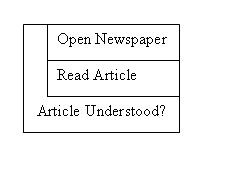
A structogram contains the following structural blocks, that are nested inside or combined with each other:

Every process (or chain of commands), a program should do, are written inside a rectangle block.

If the condition is met (true), instruction 1 will run.
If the condition isn't met (false), instruction 2 will run. Instruction blocks can also have multiple instructions.
After executing the code inside the loop at least one time the condition gets checked the first time. If this is true, the loop gets repeated.
We started creating a structogram for the Tic-tac-toe game, but your future trainer Malte isn't sure about the contents from the parts (1), (2), (3), (4), (5), (6), (7).
Can you help him?
Please write down your solutions and include them in your email to us when completed.

Now that you know how Tic-tac-toe works, we want to code it together. Don't worry. Even if you have little to no programming experience, we will get there together. 😉 We want to see and work together on your source code. We use the platform GitHub to share source code freely.
-
You already own a Github-Account or you create yourself a free GitHub-Account
-
After signing in to GitHub.com:
-
Copy our source code to your GitHub-Account. Just click here.
- Please set the visibility of the new repository - as default - to 'Public'.
-
Now scroll down the newly created GitHub repository until you see these instructions.
-
You continue from this point in the repository you have just created.
-
First you need to press the big bright green button with the content "<> Code". After that click on "Codespaces".
-
Now there is another big bright green button in the center and when you click on it the magic happens.
-
The Github workspace should open itself.
-
Github Codespace opens, this can take some minutes 😳. Please be patient. Maybe grab some snacks...
-
There should be some text in the terminal saying "Running postStartCommand...". Don't worry about it. It will run as long as the Codespace is active. You know it's done loading as soon as you see a blue circle next to "PORTS" with a number in the center of it.
-
The instructions should open themself in a nice preview. If not, open the "README.md" file and then look for the window with a magnyfing glass looking symbol in the top right corner.
-
Continue with the instructions in your Github programming environment.
Your Tic-tac-toe webapp consists of a frontend and backend part.
As frontend, we use a tool called Swagger, so we can try out APIs with a graphical interface.
Swagger is already open, as you open Githubs programming environment.
- To open Swagger click on "PORTS" you will find it in the terminal next to the text "Terminal".
- Now you can see an open port called "Laravel (80)" next to the portname there is a link. Hover over it and click the browser icon. The page that opens up now is your web interface. Keep it open you will need it! As backend, we use a PHP-App, based on the framework Laravel.
We have prepared a function that displays this game's copyright. ©️
Try this API method to display the game's copyright:
- In Swagger, click on
/copyright. - Click on the button
Try it out. - Send this request by clicking on
Execute. - You can view the output with the current copyright at
Response body.
✍🏼 Change copyright:
- Open file app/app/App/Http/Controllers/CopyrightController.php in your Codespace.
- You can find the copyright in a string format on line 18.
- Use the ASCII generator linked in
CopyrightController.phpto create your personal copyright. - Replace our copyright
By MÜNSMEDIA GmbHwith your own copyright. - Try your new copyright with Swagger!
- You need to save your changes, also named - commit (next section).
- Click on the Tab
Source Control. It looks like three points connected with lines on the left or you can press the keys Strg+Shift+G together. - You can type a message above to describe your changes as detailed and meaningful as possible. Please write your message in English, even if you are a native German speaker.
- Save your message with Strg⏎
- Click on
Yesin the pop-up window to add all your changes to your commit. - Click on the button
Sync changes, to upload your changes to GitHub. Confirm withOK. - 🎉 You have done your first Git-Commit! 🎊
You can't play against the bot programmed by the MÜNSMEDIA team yet.
It is still missing the logic it needs when the /play API route is called.
Here is the structogram for one of your turns with the play() method.

To-do:
- Take your time to look at the structogram for one of your turns!
- We have highlighted the parts that you still need to implement in the structogram.
- In file app/app/App/Http/Controllers/GameController.php the
play()method on line 144 still needs some logic.- Please complete the missing logic. We left some comments in the source code to help you get started.
- Now test it in Swagger. The function there is also called
/play. - ❌ To reset the scoreboard, you can use the
DELETE /boardmethod in Swagger - ✅ Create a commit (see above
Create commit) - 🔁 Click the button
Sync changesto upload your changes to GitHub.
We have already written a 🤖 (bot) for you, so you can play against him.
Open Swagger and alternate between the /play and /play-bot API route (the first turn is yours).
Currently, you or the bot can play multiple turns in a row, although you are supposed to take turns. Of course, it's no fun like that 😞!
To-do:
- In file app/app/App/Http/Controllers/GameController.php the
isAllowedToPlay()method on line 144 still needs some logic.- Please complete the missing logic. We left some comments in the source code to help you get started.
- Thoroughly test your changes in Swagger.
- ✅ Create a commit (see above
Create commit) - 🔁 Click the button
Sync changesto upload your changes to GitHub.
Currently, the game is unable to display a winner.
Now it's your task, to do this.
To-do:
- Currently, the method
whoHasWon()in app/app/App/Http/Controllers/GameController.php at line 104 has no game logic.- Add the missing logic. We created some hints for you as comments in the code.
- Test your changes with Swagger as detailed as possible.
- ✅ Create a commit (see above
Create commit) - 🔁 Click on
Sync changesto upload your changes to GitHub.
- Close the Codespace when you don't need it anymore. Simply by going back to the place you started it but instead of the big button you press on the three dots on the right side of the text "Active" and then click "Delete". MAKE SURE YOU COMMITED YOUR CHANGES BEFOREHAND.
- If you ever close the the Codespace tab by accident simply open it in the same three dot menu and click on "Open in Browser"
You had fun by solving these small tasks above and you want more? Ok, no problem 😈!
The method someoneHasWon() at app/app/App/Http/Controllers/GameController.php is currently ugly.
Can you simplify this, by using some loops?
It can be useful, to look at public-methods from $game:
app/app/Components/GameBoard/GameBoard.php
To-do:
- Make method
someoneHasWon()prettier - Test your changes with Swagger as detailed as possible.
- ✅ Create a commit (see above
Create commit) - 🔁 Click on
Sync changesto upload your changes to GitHub.
Think about, what you need to change, so we can play a 4x4 Tic-tac-toe. Also look closer at the class app/app/Components/GameBoard/GameBoard.php.
To-do:
- Try to make a 4x4 Tic-tac-toe
- You will need your changes from task 7.)
- Test your changes with Swagger as detailed as possible.
- ✅ Create a commit (see above
Create commit) - 🔁 Click on
Sync changesto upload your changes to GitHub.
Once you are done, sent your solution for task 1 and your GitHub-Repository link via E-Mail.
We will analyse your solution and if you are one of the 5 best applicants, we will invite you to a personal meeting, so we can get to know you better.
See you soon!