🇨🇳 中文 | 🇺🇸 English
Moss is an intelligent voice assistant built with modern AI technologies, featuring offline keyword wake-up, real-time speech recognition, intelligent conversation, and speech synthesis. The project uses a modular design and integrates various advanced AI services, including Home Assistant MCP module, to provide users with natural and smooth voice interaction experiences.
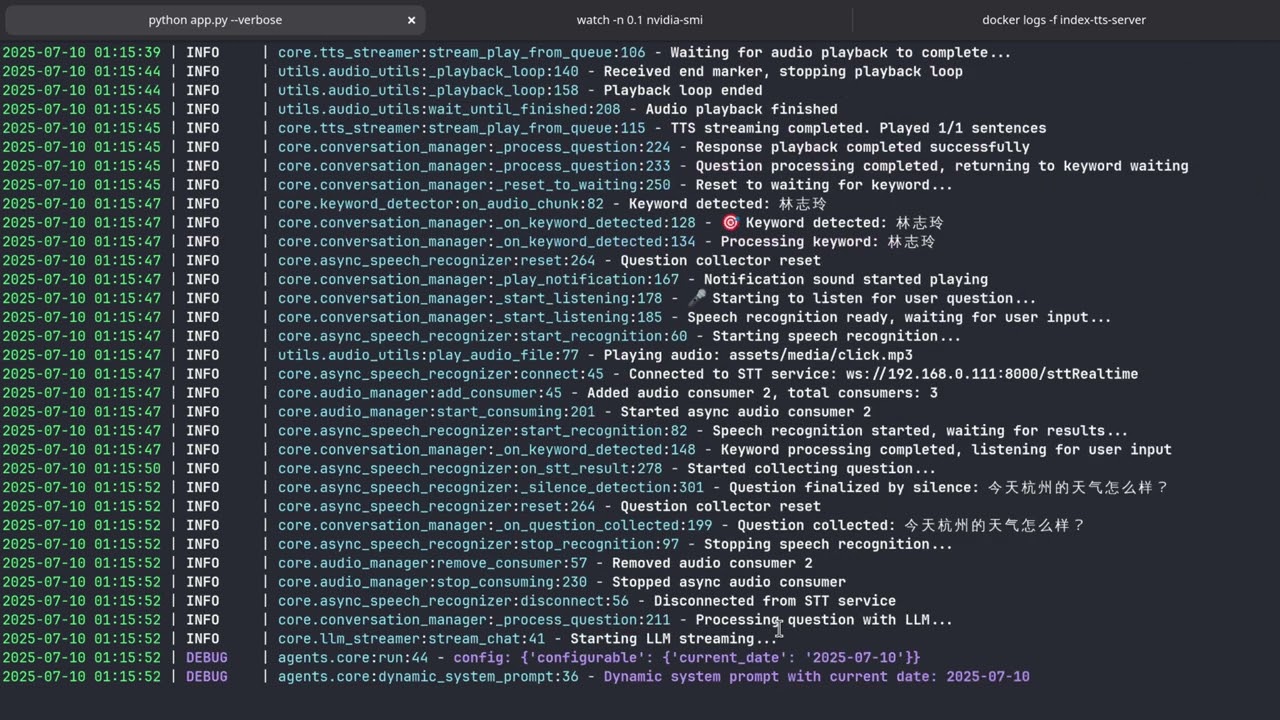
🎯 Offline Keyword Wake-up
- Complete offline keyword detection
- Customizable wake words (Chinese/English)
- Efficient sherpa-onnx based models
- Low-power continuous listening
🗣️ Real-time Speech Recognition
- WebSocket-based real-time STT service
- High-precision speech-to-text
- Streaming recognition for quick response
- Reference implementation: stt-server
🤖 Intelligent Conversation Agent
- Extensible architecture based on Langchain Agents
- Support for multiple tools and skills
- Weather queries, smart home control, etc.
- Easy to add custom tools
🏠 Home Assistant Integration
- Smart home control based on MCP (Model Context Protocol)
- Seamless integration with Home Assistant system
- Device status queries and control
- Voice control of smart home devices
🎵 High-quality Speech Synthesis
- Advanced TTS technology based on IndexTTS
- Natural and fluent voice output
- Reference implementation: index-tts-vllm
┌──────────────────┐    ┌───────────────────┐    ┌─────────────────┐
│ Keyword Detection│───▶│ Speech Recognition│───▶│  LLM Processing │
│   (Offline KWS)  │    │  (Realtime STT)   │    │  (Langchain)    │
└──────────────────┘    └───────────────────┘    └─────────────────┘
                                                         │
┌─────────────────┐    ┌──────────────────┐              │
│  Audio Playback │◀───│ Speech Synthesis │◀─────────────┘
│ (Audio Player)  │    │   (IndexTTS)     │
└─────────────────┘    └──────────────────┘
                               ┌─────────────────┐
                               │ Home Assistant  │
                               │   MCP Module    │
                               └─────────────────┘
- Python 3.12+
- Linux/macOS/Windows
- Audio devices (microphone and speakers)
- Home Assistant (optional, for smart home control)
- Clone the repository with submodules
git clone https://github.com/your-username/Moss.git
cd Moss
git submodule update --init --recursive- Install system dependencies (Ubuntu example)
sudo apt install portaudio19-dev python3-pyaudio sox pulseaudio libsox-fmt-all ffmpeg- Install Python dependencies
uv venv
source .venv/bin/activate
uv sync- Copy configuration template
cp .env.example .env- Edit the configuration file with necessary API keys and service addresses
- Configure Home Assistant connection in
.envfile
HASS_ENABLE=1
HASS_URL=http://your-home-assistant-url:8123
HASS_TOKEN=your-long-lived-access-token- Create a long-lived access token in Home Assistant:
- Go to Home Assistant Settings → Users → Security
- Create a long-lived access token
- Copy the token to your configuration file
python app.pySupported command line arguments:
python app.py --help  # View all available parameters
python app.py --verbose  # Enable verbose logging
python app.py --keywords-file assets/keywords_en.txt # Use English keywordsComing soon
Add new tools in agents/tools.py:
from langchain_core.tools import StructuredTool

def my_custom_tool(param: str):
    """Custom tool functionality"""
    return f"Processing result: {param}"

custom_tool = StructuredTool.from_function(
    func=my_custom_tool,
    name="CustomTool",
    description="Custom tool description"
)

# Add to tools list in init_tools() function
def init_tools() -> list[StructuredTool]:
    tools = [
        openweathermap_tool,
        custom_tool,  # Add new tool
    ]
return toolshttps://k2-fsa.github.io/sherpa/onnx/kws/index.html
The Home Assistant MCP module provides seamless integration with Home Assistant systems:
Supported Features:
- Device status queries
- Device on/off control
- Scene activation
- Automation triggers
- Sensor data reading
Configuration Notes:
- Ensure Home Assistant is accessible
- Configure correct access token
- Stable network connection required
For detailed configuration and usage instructions, please refer to the hass-mcp repository.
After starting the program, try these voice commands:
-
Weather Queries:
- "Moss, what's the weather like in Beijing today?"
- "Moss, check weather in Tokyo"
-
Smart Home (requires Home Assistant configuration):
- "Moss, turn on the living room light"
- "Moss, increase the air conditioner temperature"
- "Moss, turn off all lights"
- "Moss, check the living room temperature"
-
General Conversation:
- "Moss, what's today's date?"
- "Moss, tell me a joke"
The project uses Git submodules to manage Home Assistant MCP components:
# Update submodules
git submodule update --remote

# Add new submodule
git submodule add https://github.com/example/repo.git path/to/submodule- This project is still under development and may contain bugs
- Home Assistant MCP module requires stable network connection
- Ensure the security of Home Assistant access tokens
We warmly welcome developers to participate in building this project!
- 🔧 Add New Tools: Extend Agent capabilities
- 🌐 Multi-language Support: Add support for more languages
- 🐛 Bug Fixes: Report and fix issues
- 📚 Documentation: Improve project documentation
- 🎨 UI/UX: Enhance user experience
- ⚡ Performance: Optimize system efficiency
- 🏠 Smart Home Integration: Extend Home Assistant functionality
Before submitting a PR, please ensure:
- Code follows project standards
- Add necessary tests
- Update relevant documentation
- Pass existing test cases
- Keyword Detection: sherpa-onnx Sherpa-onnx
- Speech Recognition: WebSocket STT (stt-server)
- Speech Synthesis: IndexTTS (index-tts-vllm)
- Conversation Engine: Langchain Agents
- Smart Home: Home Assistant MCP (hass-mcp)
- Audio Processing: PyAudio, SoX
- Async Framework: asyncio
- Logging: loguru
- STT Service: stt-server
- TTS Service: index-tts-vllm
- Langchain: Official Documentation
- Sherpa-ONNX: Keyword Spotting
- Home Assistant MCP: hass-mcp
This project is licensed under the GPL-3.0 License - see the LICENSE file for details.
Thanks to the following projects for inspiration:
- GitHub Issues: Submit Issues
- Discussions: Discussions
Join us in building a more intelligent voice assistant! 🚀