fix: Add a line in features describing the right-click sync deps feat…#132
fix: Add a line in features describing the right-click sync deps feat…#132starksm64 wants to merge 3 commits intojbangdev:mainfrom
Conversation


…ure.

- Add a sync button to the toolbar
- Add line to UsagePanel.kt for right-click sync feature

Refs: jbangdev#102

Signed-off-by: Scott M Stark <starksm@starkinternational.com>


|
and how is this button different from the "refresh" toolbar action that also resolve and setup deps? |
Signed-off-by: Scott M Stark <starksm@starkinternational.com>
|
The "refresh" reloads the tool window view but does not synchronize the script dependencies. That is what this new button does.
|
ok - just seemed it did the refresh for me; but i'll take a look now you fixed the PR. Makes sense to get the "sync" part more visible - ultimately I would prefer it was more auto-magic as we have in the vscode plugin but haven't found a good way to do that in intellij yet that doesn't mess with possible existing build tools in idea. |
|
I could look at rolling this into the refresh as when I did a refresh I failed to see it update the project dependencies and resolve the compile error seen in a newly loaded script for example. I did also want a separate button so that one could see an explicit "synch dependencies" function as right clicking in various contexts does not always show the synch option in the menu. |
|
I think there are some issues where the side panel gets out of whack. It doesn't always update - but I rarely use it to figure out when it goes bad. |

|
TL;DR: I like the solution - just some small comments on the pros and cons w/ focus on consistency with IntelliJ gradle plugin.
I think for gradle, there is no automatic, but only a) the sync button in the gradle pane and b) the gradle sync icon within all files at the upper right corner. On the one hand, such a button is nice, on the other hand, it disturbs a bit - and the specific sync button is more helpful For b): |
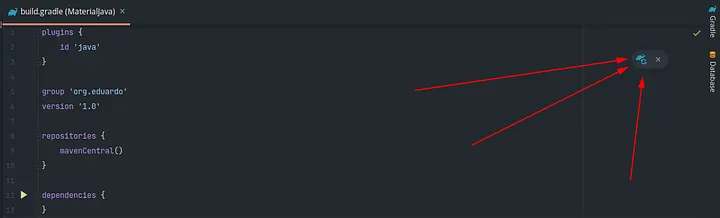
yes, there is a manual sync avaialble for gradle and others too. The "automatic" part i'm referring to is that when you open a gradle project it is "automatically" set up the first time. In vscode jbang integration similar flow happens - if the plugin can do it it will automagically sync the jars and make the source file part of the source tree so vscode java will honor it as a java file. That is the missing automagic i'm referring to - today you must know to click the sync button - even the first time. |
3 participants


…ure.
Refs: #102