Add hide/show interactions to Legend
#2276
Conversation


|
We should also make it so that either clicking the title or right clicking anywhere in the legend box toogles all entries. |

|
That's cool! Also it's probably a behavior many people expect from a legend nowadays. I'm wondering how this can be made to work with multiple axes that share a legend. Usually the legend items are constructed separately in that case, or one plot object is passed to the constructor as a proxy for all others. Which would mean that no or only one facet would have its plot hidden with the current technique. |
|
I think I have not used |
|
I just mean that semantically, one legend entry often describes multiple plots across facets. So you'd expect all of them to turn off, but the legend might have been created referencing only one (or even none) of them. So this method needs to be able to accomodate that scenario, where a list of related plots is passed by the user somehow. |
|
Still not sure if I understand correctly.
Now I can see what the problem would be here. Nevertheless I could gather some more things from your comment that we should take care of:
Again, I am really sorry that I don't understand. Usually I am not that slow 😄 |
|
Yeah maybe your last bullet point covers what I mean. I was thinking of facet plots where you have the same line plot let's say 12 times across 12 axes, but you haven't referenced all of them at once when creating the legend. I didn't check your implementation yet but if you added a plots kwarg where one could pass a vector that could take care of it. |
|
I added three more things. using GLMakie, Random
GLMakie.activate!()
Random.seed!(145)
f = Figure()
ax = Axis(f[1,1])
lb = lines!(ax, 0:4, 0:4, color=:blue, label="lines 1")
lo = lines!(ax, 0:4, -4:0, color=:orange, label="lines 2")
sb = scatter!(ax, rand(3), rand(3), color=:blue, label="scatter 1")
so = scatter!(ax, rand(3), rand(3), color=:orange, label="scatter 2")
x = LinRange(0, 4, 100)
slb = band!(ax, x, cos.(x) .- 1, cos.(x) .- 2, color=:blue, label="band 1")
slo = band!(ax, x, sin.(x) .- 1, sin.(x) .- 2, color=:orange, label="band 2")
ax2 = Axis(f[2,1])
x, y, yerr = 1:2:20, 5 * rand(10), 0.4 * abs.(randn(10))
bb = barplot!(ax2, x, y; strokewidth = 1, color = :blue, label="barplot 1")
bo = barplot!(ax2, x, -y; strokewidth = 1, color = :orange, label="barplot 2")
Legend(f[1,2], ax)
Legend(f[2,2],
[ PolyElement(plots = [lb, sb, slb, bb], color = :blue),
PolyElement(plots = [lo, so, slo, bo], color = :orange) ],
[ "blue", "orange" ], "Colors" )
f
Side note: |
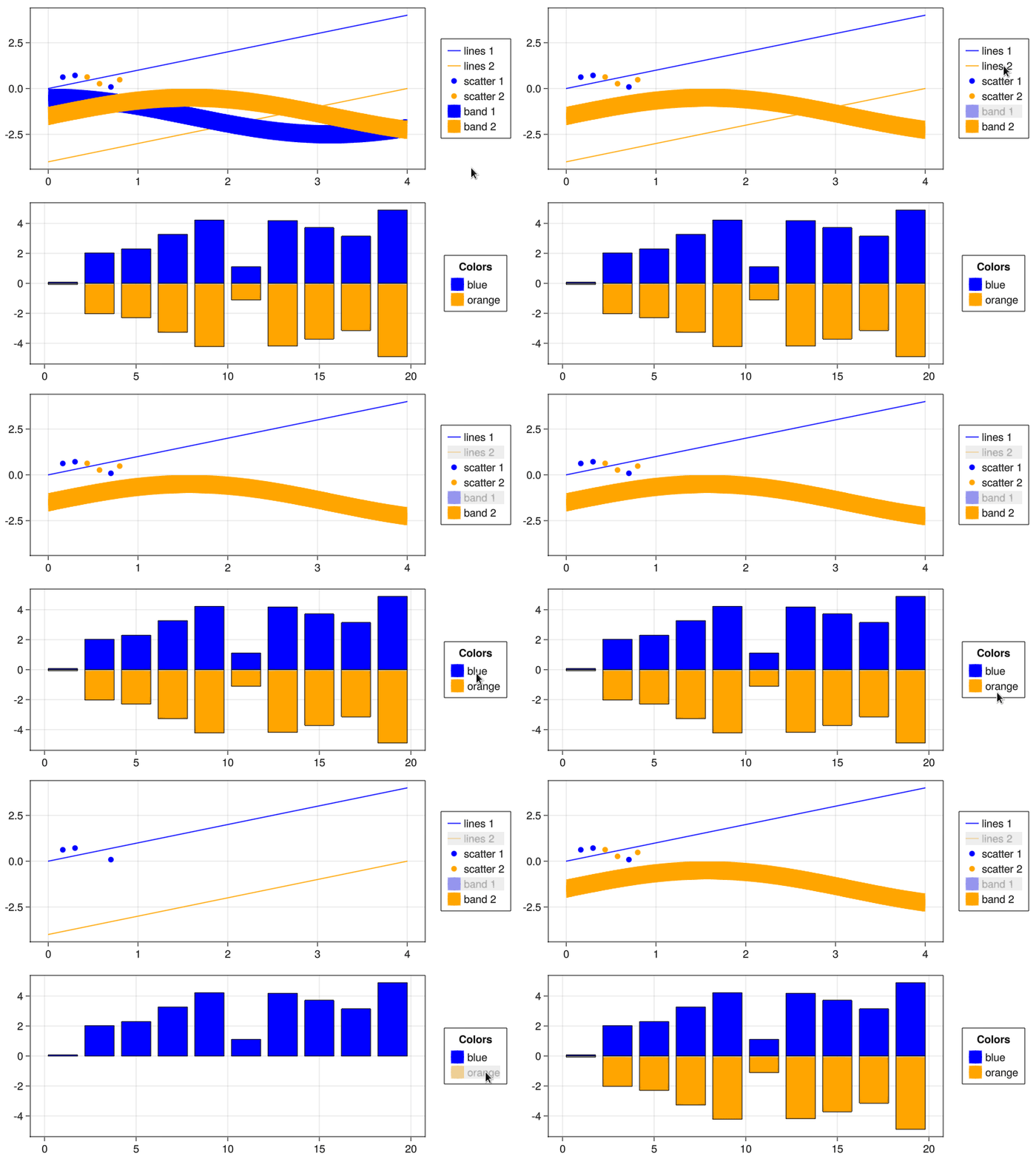
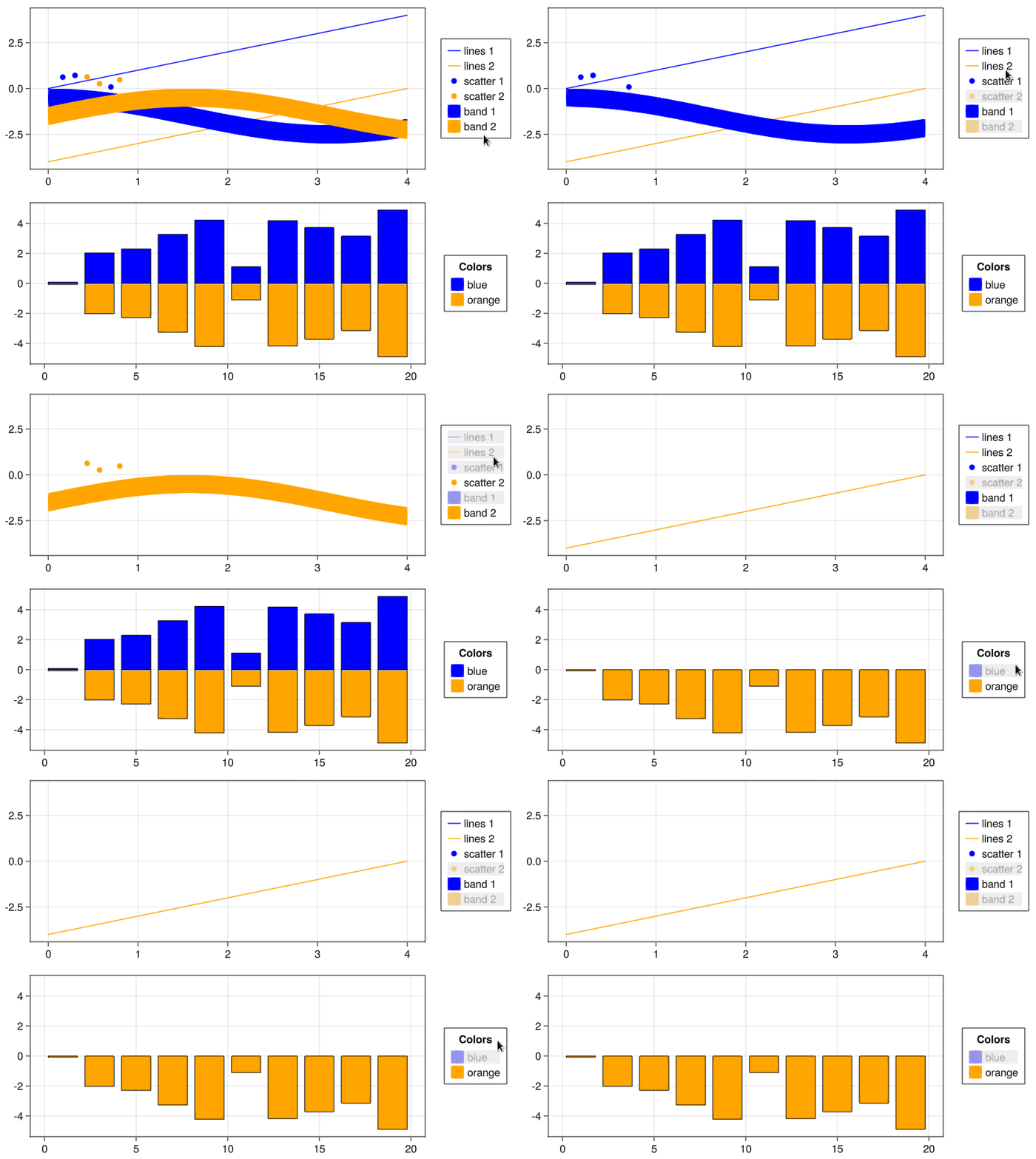
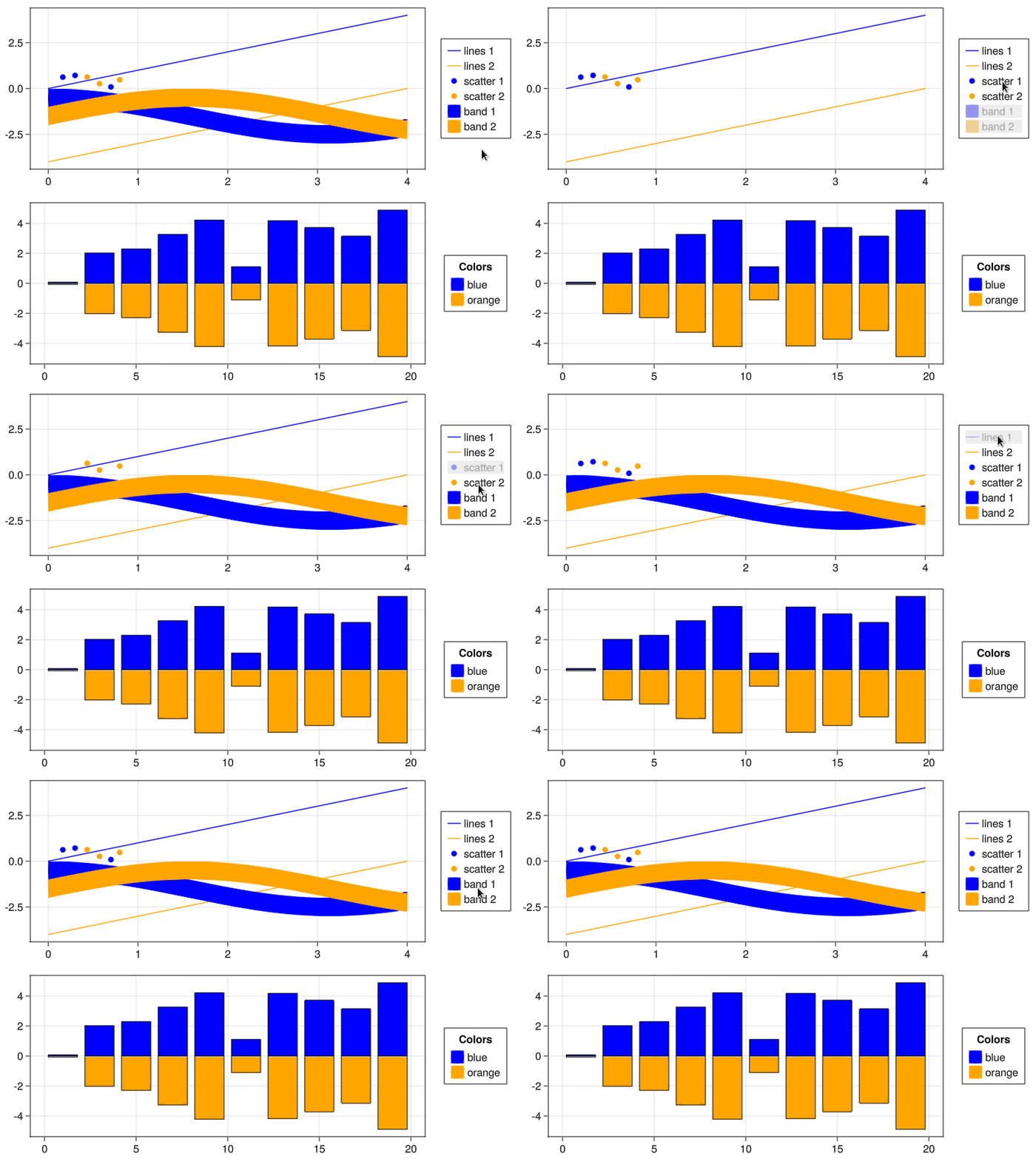
We now put a hatched shade on top of a legend entry if at least one of
its associated plot elements is hidden. If all are hidden we put
a full shade.
Also removed middle mouse click and made the right click such that
it reset the visibility for all plot elements.
|
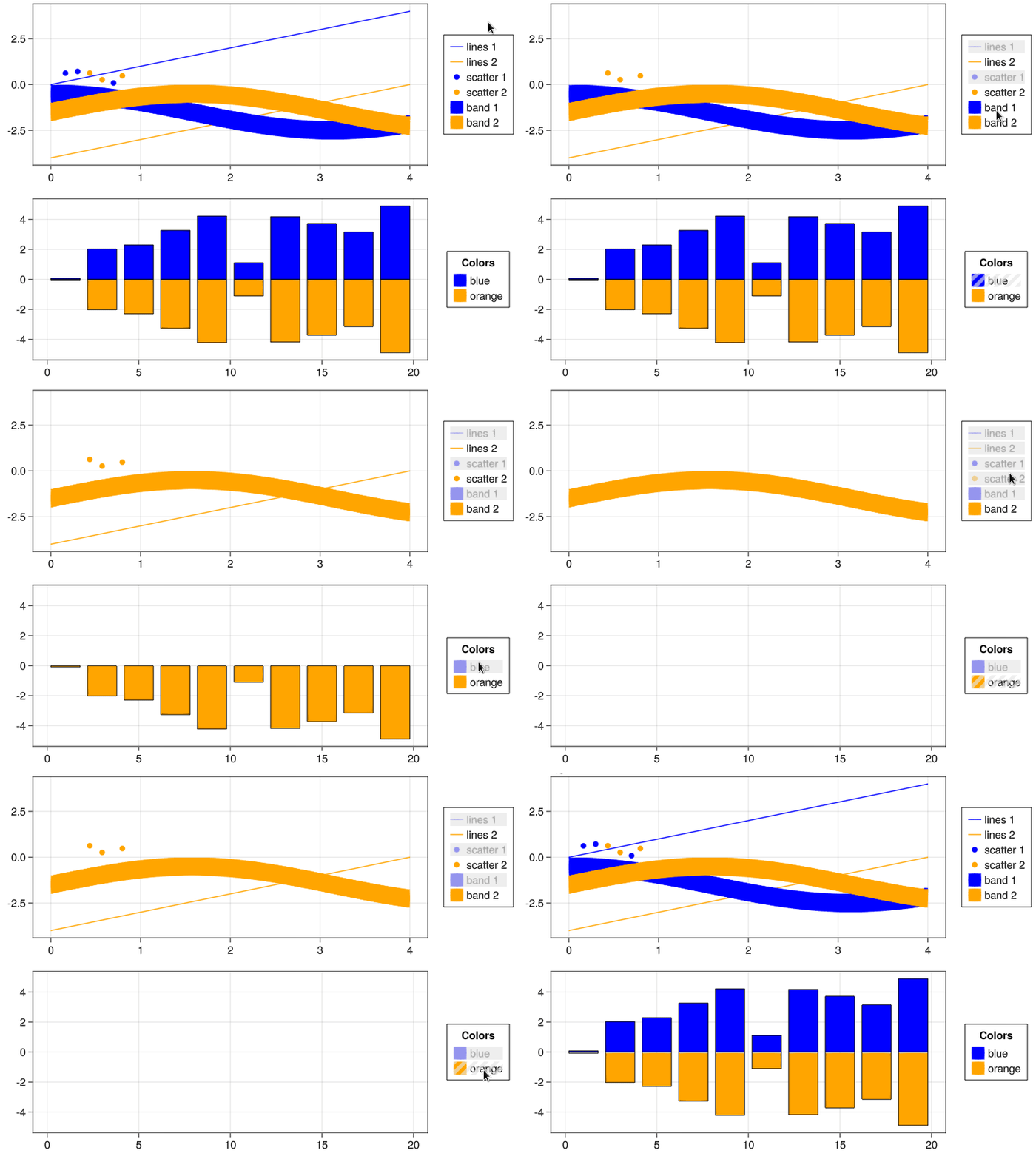
I reworked the toggling strategy again so that it addresses the problem of partly hidden elements. We now use a hatched box if not all plots of an element are either visible or hidden. If all are hidden then we put a full box. I also simplified the mouse interactions: Left click now toggles all elements of an entry and right click anywhere in the legend resets all all plots of all elements, no more middle click.
There is also a question about what to do with plot elements that are already hidden when the legend is created. Consider the following using GLMakie, Random
GLMakie.activate!()
Random.seed!(145)
f = Figure()
ax = Axis(f[1,1])
lb = lines!(ax, 0:4, 0:4, color=:blue, label="lines 1", visible=true)
lo = lines!(ax, 0:4, -4:0, color=:orange, label="lines 2", visible=false)
Legend(f[1,2], ax)
fThe plot would start with only Otherwise, I think this would be ready for a review. |
|
Here is a list of plot elements for which toggling does not work:
I could not test for the following ones because they cannot be to added to
Last but not least: The legend symbol for |
|
The |
|
This here might explain why the Makie.jl/WGLMakie/test/runtests.jl Line 55 in 36ad29f |


|
I merged master and
TODO:
Need to think about whether this is fixable without too much effort |
Ah this is not the case anymore, I think I added/updated everything that's necessary to merge this pr now. Refimg tests looked a expected in e87e2e3. Benchmark plots looked fine too |


Co-authored-by: Mo-Gul <Mo-Gul@gmx.net>

| @warn "LegendElements should now keep track of the plots they respresent in a `plots` field. " * | ||
| "This can be `nothing` or a `Vector{Plot}`. Without this, the Legend won't be able to " * | ||
| "toggle visibility of the associated plots. The `plots` field is missing in: $bad_types" | ||
| end |

There was a problem hiding this comment.
Shouldn't we just use something like this?
function get_plots(le::LegendElement)
    hasfield(typeof(element), :plots) && return le.plots
     @warn "..."
    return nothing
end| for element in entry.elements | ||
| if (element !== nothing) && hasfield(typeof(element), :plots) && (element.plots !== nothing) | ||
| for plot in element.plots | ||
| !hasproperty(plot, :visible) && continue |
There was a problem hiding this comment.
I feel like we should just guarantee that every plot has a visibility field.

There was a problem hiding this comment.
We should, but I see that as wasted effort before #4630.
| function get_plot_visibilities(entry::LegendEntry) | ||
| visibilities = Observable{Bool}[] | ||
| for element in entry.elements | ||
| if (element !== nothing) && hasfield(typeof(element), :plots) && (element.plots !== nothing) |
There was a problem hiding this comment.
should use the get_plots(le)


|
Closing in favor of: #4927 |
9 participants


Description
Adds the ability to toggle plot elements by clicking on their label inside a
Legend.Mimics
gnuplots toggling behavior.The functionality relies on
<:AbstractPlotobjects having avisibleattribute. If there isn't one, we still put a shade above the legend entry.Type of change
Delete options that do not apply:
Checklist
I think this not needed.
Should we add a ref image that uses
pickand generates a plot with missing elements? And can I even add one myself?