Chat Macros
| Features | PoE1 | PoE2 |
|---|---|---|
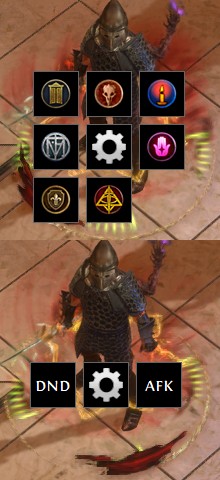
| quick-access macros and "chat wheels" | ✔️ | ✔️ |
| 2 separate hotkeys with up to 9 macros each | ✔️ | ✔️ |
- this feature has its own section in the settings menu, with UI and sub-feature settings
main UI-elements & user interaction
|
screenshot |
|---|---|
|
regular macro: - tap the fast-travel hotkey to use the /hideout command- tap the custom macro hotkey to use a specific command (default: logout)"chat wheels": - hold one of the hotkeys to open a wheel with additional commands |
 |
-
open the settings menu, go to the
chat macrossection -
by default, this feature is disabled until you set up the hotkey(s)
-
to be more efficient, this feature uses normal and long key-presses
-
fast-travel:
tapto use the "/hideout" command,holdto open the "chat wheel" -
custom macros:
tapto use command 0 (default: "/exit", logout),holdto open the "chat wheel"
-