This repository was archived by the owner on Jan 28, 2026. It is now read-only.
Home
🔍 Enhance pull request reviews with visual testing feedback, automated quality checks, and interactive dashboards



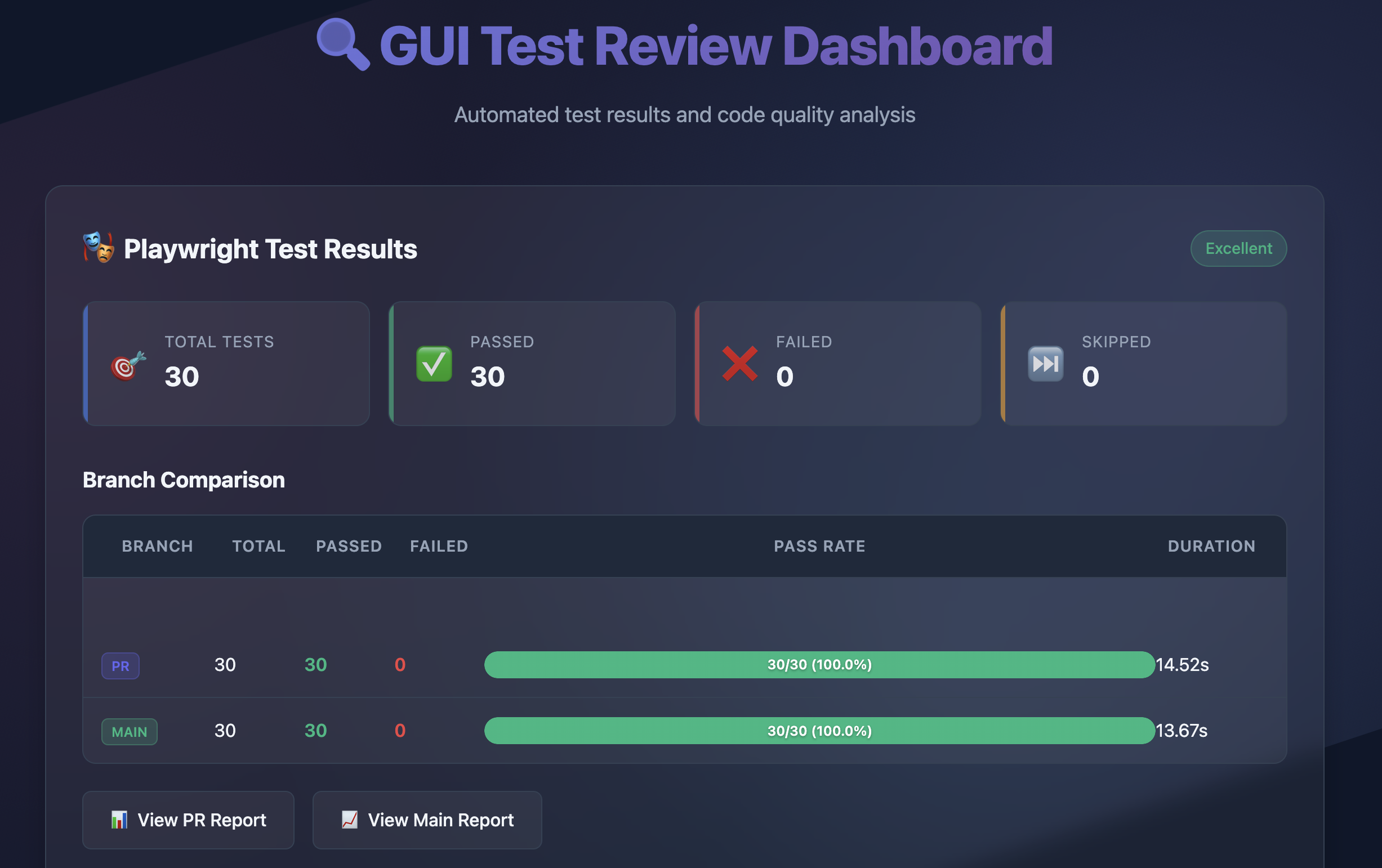
Automatically captures and displays visual context from your Playwright tests directly in GitHub pull requests - no more asking reviewers to run tests locally to understand what changed.
- 🔄 Visual Comparison - Side-by-side test results from PR vs main branch
- 📊 Interactive Dashboard - Beautiful test reports with flowcharts and metrics
- 📋 Review Checklists - Automated tracking of review completeness
- 🎨 Code Quality - ESLint/Prettier checks with inline PR feedback via reviewdog
- 🚀 Modular Design - Use all-in-one or integrate with existing CI/CD
Add to your workflow in 30 seconds:
name: GUI Test Review
on: [pull_request]

jobs:
  test-review:
    runs-on: ubuntu-latest
    permissions:
      contents: read
      pull-requests: write
      pages: write
      id-token: write

    steps:
      - uses: actions/checkout@v4
      - uses: DigitalProductInnovationAndDevelopment/Code-Reviews-of-GUI-Tests@v1
        with:
          github-token: ${{ secrets.GITHUB_TOKEN }}
          enable-visual-comparison: 'true'  # Compare PR vs main
That's it! The action will:
- Run your Playwright tests
- Check code quality with ESLint/Prettier
- Generate an interactive dashboard
- Post a summary comment on your PR
your-gui-project/
├── tests/                          # GUI test files
│   ├── *.spec.{js,ts,tsx}         # Playwright test files
│   └── fixtures/                   # Test data and fixtures
├── scripts/                        # Action scripts (auto-included)
├── package.json                    # Dependencies
├── playwright.config.js            # Playwright configuration
├── .eslintrc.json                  # ESLint configuration (optional)
├── .prettierrc.json               # Prettier configuration (optional)
└── README.md                       # Project documentation
Add these to your package.json:
{
  "devDependencies": {
    "@playwright/test": "^1.52.0",
    "@mermaid-js/mermaid-cli": "10.6.1",
    "@octokit/core": "^5.0.0",
    "@typescript-eslint/eslint-plugin": "^8.35.0",
    "@typescript-eslint/parser": "^8.35.0",
    "eslint": "^8.0.0",
    "eslint-plugin-playwright": "^2.2.0",
    "eslint-plugin-prettier": "^5.5.1",
    "marked": "15.0.12",
    "prettier": "^3.3.2"
  }
}Already running tests? Just add the dashboard:
jobs:
  your-tests:
    # ... your existing test job

  dashboard:
    needs: [your-tests]
    runs-on: ubuntu-latest
    steps:
      - uses: actions/checkout@v4
      - uses: actions/download-artifact@v4
      - uses: DigitalProductInnovationAndDevelopment/Code-Reviews-of-GUI-Tests@v1
        with:
mode: 'dashboard-only'with:
mode: 'test-only' # or 'lint-only'| Input | Description | Default |
|---|---|---|
mode |
full, test-only, lint-only, dashboard-only
|
full |
enable-visual-comparison |
Compare PR vs main branch | false |
enable-github-pages |
Deploy dashboard to Pages | true |
test-files |
Test file pattern | tests |
- PR Comment with test summary and metrics
- Interactive Dashboard with test flows and results
- Inline Code Review feedback via reviewdog
- Visual Comparisons between branches
- Review Checklist tracking
- Configuration Reference - All inputs, outputs, and options
- Integration Patterns - Advanced CI/CD setups
- Architecture Guide - How it works under the hood
- Troubleshooting - Common issues and solutions
This project was developed for the Digital Product Innovation and Development Seminar at TUM.
📚 Full Academic Context & References →
This project is licensed under the MIT License.
- Built with Playwright
- Powered by reviewdog
- Visualizations with Mermaid
- GitHub integration via Octokit