 Meshtastic
Swiss Meshtastic User #24

Replies: 59 comments 154 replies

-
|
For all those who are wondering why Discours is no longer available, here is the official explanation |
Beta Was this translation helpful? Give feedback.

-
|
It's so simple: no routing = no traffic! |
Beta Was this translation helpful? Give feedback.

-
|
@orbiter5 are you referring to the moving of discussions from Discourse to Github? I am afraid I do not follow / understand you. |
Beta Was this translation helpful? Give feedback.
-
|
When I look at the Meshtastic map of Switzerland, I've noticed for some time, that there are many more connections between the nodes in the Lower Valais and Lake Geneva basins, showing the relationships between them. |
Beta Was this translation helpful? Give feedback.

-
|
My understanding is that a lot of information displayed on liamcottle.net is collected through some of the devices that are connected via MQTT protocol. Such devices are marked as green dots in the map. Last time I checked the northern part of Switzerland shows almost no green dots, only blue dots. There is a reason for this. In order not to block bandwith with unimportant telemetry data the community in northern Switzerland agreed to limit telemetry to an absolute minimum. Every user should follow the following “Swiss Mesh Netiquette” see link: https://is.gd/vokKqU |
Beta Was this translation helpful? Give feedback.

-
|
Hoi all, I just got into meshtastic and Lora. I was reading the “Swiss Mesh Netiquette” and I found that we need to add a case: moving nodes. I bring this example as I got a T-watch-s3 and a t-echo. Actually also a t-deck and a t-beam, but I want to An almost tracking system for my child, with a special communication channel. So in the Device Roles section I'd add a case: Case C) Moving devices As a starting point I'd set them to CLIENT_MUTE This should grant that anybody with a LoRa watch is not interfering with a stable network. But this is my first opinion. Some open questions might be:
For example I read that PMR (PMR446 WalkieTalkie) starts to be used ... :( only now:
In this specific case, I would add a note that in the mountains, you MUST use CLIENT. As I just started these are mainly my personal considerations. What do you think? A+ |
Beta Was this translation helpful? Give feedback.

-
|
Hoi Mariotti, Thank you for your input and comments about our "Swiss Mesh Netiquette." The Netiquette we created is meant to apply to "normal nodes." While there are certainly many additional scenarios, the idea is to give newcomers a quick and simple overview. Adding too many details might discourage people from reading it. While I completely agree with you that moving nodes should preferably be set to Client_Mute, I don’t agree that nodes in the mountains should be set to Client. I understand your point that in remote areas, every node set to Client might potentially increase the chances of connecting to the network. However, mountains are everywhere here. We’d end up in the same situation we started with: every node in a car, backpack, or pocket would send out DeviceMetrics and Positions every few minutes into the mesh. To make doubly sure, people would also set the Hops to 7, so even users 150 km away would be disturbed. Did you check out this video? https://www.youtube.com/watch?v=htjwtnjQkkE In general, I would never rely on Meshtastic as a reliable emergency system. 73 de Matthias |
Beta Was this translation helpful? Give feedback.

-
|
Hoi Matthias, We are in full agreement :) I just started with LoRa, and not exactly a mountaineer :) It was more not to simply close the discussion with, just set it to "client_mute". Yet, with these new devices I would still propose a point C :) Thanks a lot for your infos! I do not think we need to discuss right now the point C inclusion. Thanks again |
Beta Was this translation helpful? Give feedback.

-
|
Latest "Mesh Traffic" Graphics Attached are the latest traffic graphics from the "Mesh Traffic Observer" node in Basel. This time, it took a bit longer to prepare. The output of the Meshtastic Python CLI changed several times, which broke my script's ability to read the data. I adjusted the parser once, but the second time it was just too much trouble. Now, a Raspberry Pi runs an MQTT broker that provides the data exactly how my script needs it. A big thank-you to Jean-Marc for sharing his MQTT script - it was very helpful. Oh, and by the way, my Heltec device stubbornly refuses to get the time from the NTP server. I had to replace the timestamp in the JSON (outside of the payload) with the system time. My trust in the constantly changing firmware versions has not increased because of this… Anyway, here are the latest data: https://drive.google.com/drive/folders/1vNUbksbY7vqEE4apPSPC5ItU47RTsft9 Time period: 6 days (Monday to Saturday, November, 11th - 16th) The overview graphics show all nodes whose transmissions were received more frequently than every 2 hours (based on the median). The graphics include a short explanation text with suggested settings. Additionally, I’ve created individual graphics for all your nodes. You can find your node by sorting them by "long_name." It’s nice to see that quite a few people have switched their nodes to "Client_Mute." We’re now up to about 20 nodes. 73 de Matthias |
Beta Was this translation helpful? Give feedback.
-
|
Thank you both :) @FJF130 @salfare That said, I can’t explain why the latest data shows my main node sending out NodeInfo only once in six days—it doesn’t seem right. I suspect it’s incorrect. The data collection method and observer node settings were different this time. Previously: For the latest analysis: I’m still not sure how of if these changes have affected the dataset.
|

Beta Was this translation helpful? Give feedback.
-
|
Just out of curiosity @FJF130 who are the FB users? I mean which app, project, device? |
Beta Was this translation helpful? Give feedback.

-
|
Update after upgrading my nodes to 2.5.11.8e2a3e5 Beta. in Releasenotes Meshtastic Firmware 2.5.11.8e2a3e5 Beta I found: I think that caused the high number of Nodeinfos sent previously. |

Beta Was this translation helpful? Give feedback.

-
|
MTO: The Link you sent over the mesh was how I found your document, it was very helpful and also got me to upgrade the firmware on and settings my several nodes. Interresting, I have been active since years and in the beginning there were no nodes rechable. Now I constantly at the max limit of 100 neighbors. |
Beta Was this translation helpful? Give feedback.
-
|
@hb9eue Thanks, I'm glad our document was of help. Yes, the Mesh became indeed quite busy |
Beta Was this translation helpful? Give feedback.

-
|
Thank you Matthias for your work. I discovered 1-2 of my routers in your list. They rebooted shortly after the OTA update and lost all their information. I'll climb the hills and give them names again. For those interested, here is the link to our Meshtastic Switzerland FB group: https://www.facebook.com/groups/771317178261325 73&55 Halfinger73 Simon |
Beta Was this translation helpful? Give feedback.
-
|
Hi Fabio, |
Beta Was this translation helpful? Give feedback.

-
Speaking as someone who has been building online communities since the '90s ... you have the right approach. You, as someone who is building a community, you will find where the outliers are and eventually find a way to bring them in. The ethos you build within your community will extend beyond the the confines of what you are doing. Focus on ethos and you will maintain your influence. |
Beta Was this translation helpful? Give feedback.
-
|
Hoi all, I did not want to start a semi political discussion, we can continue it in a different place if needed. I was just suggesting that FB might not be a community for everybody. You gonna lose me there :( . @mc-hamster you should be about my age then ;) As soon as we go back to tech things here, I can survive without FB :) Cheers |
Beta Was this translation helpful? Give feedback.
-
I'm not on FB either. :) |
Beta Was this translation helpful? Give feedback.
-
|
I am not on Facebook either. Greetings from fox 71, Swiss knife valley |
Beta Was this translation helpful? Give feedback.
-
|
JIC, this is my zuerich view: 
What I do not understand is a list of node with like 5 hops aways. While my settings are set to 3. |
Beta Was this translation helpful? Give feedback.
-
|
@garthvh, kinda asynchronous (I mean, if I want to reach the 7 hops node, i'd need the same hops settings?). If you please have a bit of time, I'd like to understand this. Can you suggest any specific reading? Thanks a lot in advance |
Beta Was this translation helpful? Give feedback.
-
|
Hi Mariotti For the sake of simplicity the answer is yes, you would need to set hop to 7 too. See hop count A message knows who the target node is but not how to get there. There are ideas to make it more sophisticated and directed but I think it's not implemented. The higher your hop setting the further your transmission is traveling. There is one frequency we all use when using Long_Fast as primary channel. A node is not transmitting when it hears another node sending. Therefore it's important to keep the traffic low and users are recommended to kep the setting at 3. |
Beta Was this translation helpful? Give feedback.

-
|
Thanks Matthias for your answer, |
Beta Was this translation helpful? Give feedback.
-
|
Thanks @MeshTrafficObserver , this is a bit more clear. while I knew the first documents, I'll spend some time on the new propositions. I enjoyed the "for simplicity" part ;) I think it is anyway fine for broadcasting, i.e. I do not need to go to 7 hops as I might just be a receiver. @Haflinger73 in practice we keep up a list of nodes that a device can use.(* if close enough) Just tonight, I got a private (unwanted) conversation, on LongFast in ZH region. We use meshtastic because is fantastic, not because we need to keep up a specific network. I will be with you about "netiquette". Thanks all, |
Beta Was this translation helpful? Give feedback.
-
|
JIC: With MQTT in theory you can reach your friends in the other part of the world. As soon as you are in the same channel. |
Beta Was this translation helpful? Give feedback.

-
|
Started couple of days ago with old ttn hardware into meshtastic. Works fine but I'm an alien. |
Beta Was this translation helpful? Give feedback.
-
|
Hoi Peter Welcome to the Mesh World. Grüsse, |
Beta Was this translation helpful? Give feedback.

-
|
Thanks, will give it a try! |
Beta Was this translation helpful? Give feedback.
-
|
Tried it immediately until today and had no response using LongModerat. |
Beta Was this translation helpful? Give feedback.
-
|
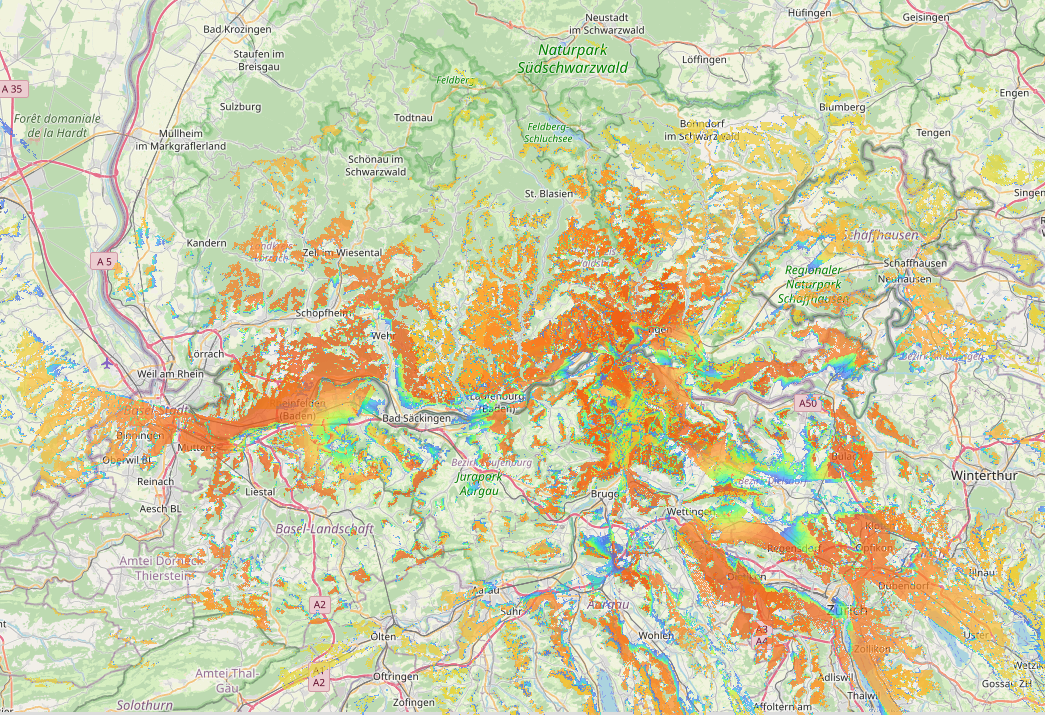
this could be my range if using the desired install position. As you see, it is mainly going into the south and this is why i get notice from the swiss nodes. Will continiue if the new 18650s arrive. here my potition marked in the mestastic map: |


Beta Was this translation helpful? Give feedback.
-
|
Hi Peter P.S. sent you a direct message via the Mesh |
Beta Was this translation helpful? Give feedback.
-
|
Hello Peter, I think we already had contact via the Mesh. |
Beta Was this translation helpful? Give feedback.
-
|
yes, we had mesh contact already. Actually the desired node is located around the building as i'm still experimenting with power source. A brand new 3,5W solar panel is not enough to keep the node running. So i will have to have 18650s als 1s2p. Due to lack of understanding how to secure and how to select a proper BMS it will take a few more days to have the node up on the mountain running. |
Beta Was this translation helpful? Give feedback.
-
|
From my own experience (HR-Routrer), a 5W module is sufficient in our latitudes if you can point it to the south and don't have much shade. But I saw that you are using a Heltec V3 in your router. This will only just work with a >20W PV cell. The esp32 chips simply need too much energy compared to an nrf52 chip. |
Beta Was this translation helpful? Give feedback.
-
|
Hello Peter, I just saw your gmx email today, but I can't reply (encryption...) I wrote dbpf on your node. Greetings Simon |
Beta Was this translation helpful? Give feedback.
-
|
Please tell me that i'm not the only one who had trouble with text messages today. |
Beta Was this translation helpful? Give feedback.
-
|
I turned on my Mesh Traffic Observer in Basel again and recorded the traffic over the last 6 days. There was quite a lot happening on the mesh. During this time, 441 different nodes were online, and my node database now lists a total of 1063 nodes. However, I did not receive complete data from all of these nodes. That's why the number of nodes shown in the summary graphics is sometimes lower. The hop setting has shifted. Although "3" is still the most common, "7" has increased significantly. As always, you can view the data on my Google Drive. There is also an individual graphic for every node that was received. https://drive.google.com/drive/folders/1vNUbksbY7vqEE4apPSPC5ItU47RTsft9 As a new feature, I have now listed the air utilization for nodes with a value of 4.5 and above (median air_util_tx). 73 de Matthias |
Beta Was this translation helpful? Give feedback.

-
|
Hoi here short question. I (Guemligen) have been offline more or less for 4 weeks due to a node failure. Now I reconnected everything, waited 3 days, but I can not see any other nodes. Which is strange because I am sure everything is as it has been before. (Antenna, Cabel, what ever) Looking forward to your replies. Bestes Grüssli My Channel/LoRa config attached:
|
Beta Was this translation helpful? Give feedback.

-
|
Hi all I'm new to meshtastic. Regards |
Beta Was this translation helpful? Give feedback.
-
|
FYI: In Aargau, some of my routers (HR routers) were updated with Jean-Marc's custom firmware. |
Beta Was this translation helpful? Give feedback.
-
I think airtime TX / AirUtilTX has a one-to-one relationship to duty cycle max. 10% per hour, on a rolling basis. That explains why AirUtilTX can be anything up to 10%, I believe. |
Beta Was this translation helpful? Give feedback.

-
|
In the Schwyz Swiss Knife valley / Schwyzer Talkessel, someone is operating a Router node up high on the mountain below Wildspitz that reaches the entire Schwyz valley, including Schwyz, Steinen, even Brunnen probably and also reaches up towards Sattel. As well as towards Zugersee. The node is named "Esel". So, for new nodes in the Schwyz Swiss Knife valley, we should really let the node named "Esel" do its job and not create any other nodes with role "Router". Later on this year, to get further on to Uri, we might install a router node somewhere high up near Seelisberg, we will see. Swiss knife valley users: please, refrain from configuring your devices as router, cause spirit 71 already did so and it is doing a fantastic job. Also, to avoid packets being transmitted and received multiple times by end user's devices (Num Rx dupe), please set your devices to role client_mute (which is really more akin to client passive towards other nodes' packets) in the Swiss knife valley, especially if you are in the trenches between houses or behind the window in a house. Otherwise, an occasional client on a very elevated location (grain or mill tower) is ok. https://www.youtube.com/watch?v=htjwtnjQkkE https://meshtastic.org/blog/choosing-the-right-device-role/ https://meshtastic.org/docs/configuration/radio/device/#roles Best regards fox 71 |
Beta Was this translation helpful? Give feedback.
-
|
The past two days, I had the MTO running again. The time period was from Friday 11:00 AM to Sunday 11:00 AM. I have uploaded your data (the overview and your individual graphics) to the gDrive: It seems there are still quite a few nodes operating with rather old firmware. Philipp recently updated the "Sonnenberg" to the latest version. The difference is remarkable — the persistent NodeInfo transmissions have disappeared. Many thanks for that 😀👍 Enjoy reviewing your nodes. |
Beta Was this translation helpful? Give feedback.
-
|
Bremcom is somewhere close to Bremgarten ... that node came up strong on the Autobahn going south from Zurich. Question is, who is maintaining those :-) |
Beta Was this translation helpful? Give feedback.
-
|
@CamFlyerCH about evaluating device metrics during testing of a router nearby: Instead of your modification related to 0 hop telemetry, would an alternative for me, if I do not want to have any firmware modifications, |
Beta Was this translation helpful? Give feedback.

-
|
You can set a router to hop limit 0. This does not affect how he routes packets. The only issue is, that nodes further away can't see the router's long and short name in a traceroute. |
Beta Was this translation helpful? Give feedback.

-
|
Hoi everyone. Anyone knows "Belpberg" Router_Late? I am more or less disconnected from the Mesh after it came up 6 days ago. I will try to contact it while MeshWalking. Beste Gruesse |
Beta Was this translation helpful? Give feedback.

-
|
Actually you answered the solution to my problem already in your last post. Have just seen it. Sorry for that. I thought it was Belpberg because the traceroute ended there. My actual problem seems to be that I can't reach "grat" router anymore. - Gümligen_MEDIUM GU73 !435a9c8c / merci fürs antworten |
Beta Was this translation helpful? Give feedback.
-
|
Hi @PatrickDch @MeshTrafficObserver @Haflinger73, do you know who manages Grat Router grat - 2.6.4 !f1d56c41 near Thun, somewhere near Stockhorn? Similar to other high-altitude mountain routers, because it is set to Router, it prematurely grabs hops from really far away like Waldenburg BL near Vogelberg (4437/1) and 5233/1 near Villigen AG. It would be great if, for BL, SO, AG, Grat router would first give other Nodes a chance to transmit/rebroadcast, then rebroadcast a little delayed, meaning if Grat Router were set to device role ROUTER_LATE. See https://github.com/orgs/meshtastic/discussions/24#discussioncomment-14397405 We have already done that with most of the SZ LU ZG NFN mountain nodes; set them to ROUTER_LATE with very good results. Also, any node still on 2.6.4 should update to the current stable version 2.6.11. NextHopRouting in 2.6.4 had a bug in it where device roles ROUTER, ROUTER_LATE would not relay / rebroadcast direct messages (NextHopRouter.cpp). It was fixed in 2.6.11 or 2.6.10. |
Beta Was this translation helpful? Give feedback.
-
|
Sorry, tried to figure it out but... nope... I have no clue. 😌 |
Beta Was this translation helpful? Give feedback.
-
|
@shalberd nope, sorry. I checked the node number (4057295937) and the name in FB, but could not find any postings. The router has 3 hops, GPS is set rather unprecise. More I can't unfortunately not see. |
Beta Was this translation helpful? Give feedback.
-
Since it is near to me I tried many times to find out who manages it with no success. 😒 |
Beta Was this translation helpful? Give feedback.
-
|
Hoi everyone, Here is a new mesh statistics report from Northwestern Switzerland. This time, I’ve also included individual graphs for your nodes again. You can sort the graphs by (long) name (if known in my log file) to find your node. The individual node graphs are in the “Per Nodes Graphs” folder, the overview graphs are in “Summary Graphs.” Time period: July 13–19, 2025 (7 days) https://drive.google.com/drive/folders/1vNUbksbY7vqEE4apPSPC5ItU47RTsft9 The "READ-ME" PDF has been updated. It explains the graphs in more detail and includes background info. It now also contains French and English translations. In the "Summary Graphs" folder, you will also find a new PDF: "Intervall_position_transmissions_19Jul25" Our recommendation for fixed nodes to use long intervals (> 2 hours) for position broadcasts is unfortunately being ignored more and more. Please check your node settings and adjust them if needed. Also a reminder: only use SmartPosition in special cases (e.g., when hiking). So please consider to use fixed intervals and turn off SmartPosition. Wishing you all a nice Sunday. |

Beta Was this translation helpful? Give feedback.

-
|
Hi Matthias, I am impressed of your mesh statistics an plan to do the same for our Bavarian mesh. Would like to ask if you can elaborate a view things.
I assume the Gini coefficient is calculated for each packet type over the measurement periode? Does it makes sense to calculate the Gini for all packet types of a single nodes transmission and take its value to include or exclude from the "bad" nodes list? How you create the plots? I am struggling to get the median into the plot. Here are view (bad) examples I have so far: Someone running obviously running Meshsense and hammering traceroutes: Fixed station obviously with SmartPosition enabled: Fixed station running very old firmware where no scaler applies: The number in the title is the Gini for all packet types of this node. About my setup:
The mesh-observer code is also visualizing the Mesh based on the trace route information in the debug log: |


Beta Was this translation helpful? Give feedback.
-
|
Hi Mictronics Thanks. I’m glad I could give you some idea.
It's calculated for each individual node and its transmission type
The original idea was to exclude nodes from the summary plots in case they did not show a consisten transmission pattern. E.g. someone walks the dog with smarposition on, firing positions like crazy for 2h, but thereafter only have a few positions transmissions sent over the next few days. The median value for the intervall would be very much misleading and there would be far to many nodes to fit on the plot. The gini filter is only active in the summary plots. In the node specific plots (the ones you generated too) there is no gini or 2h filter. It shows all transmissions. Thinking about it now it could be discused if using "first and last" position transmission during measurement periode (regardless of node) would make more sense. But I did not want to compare the nodes to each other but have them assessed individually.
Well… that a good questions. What has been important was to plot invisible ghost dots in case there is no transmission of a specific type (it always messed up the alignment (for hours and hours…..)). Have a look at the script snippet. These two parts generate the summary and the individual graphs. Hope it helps you. One question to you. In your graphs you have «Host Metrics». What is this and how is it different to the «Device Metrics»? Would you mind sending me a JSON block showing such a transmission and it’s payload? I think I have not seen this when logging the MQTT data. Let me know if you have any other questions. P.S. like you R&S you used for your antennas :) |
Beta Was this translation helpful? Give feedback.
-
|
Hi Matthias, For example all the trace route packets are visible in debug even when the sniffing node is not affected. That's btw how I create the mesh visualisation. Thanks for your feedback, much appreciated. I will keep fiddling... |
Beta Was this translation helpful? Give feedback.
-
|
@matthias The result can be seen here: https://www.mictronics.de/bayern-mesh/ |
Beta Was this translation helpful? Give feedback.
-
|
Hoi Michael Couple of questions: Assuming that your method can as well track (but not decipher) transmissions outside the primary channel, are there many nodes sending on privat channels? If so, can you estimate from your data the ration between transmission load on primary versus sum of private channels? Just curious to get an estimate what could come on top of what I see with my MQTT method. Could you please elaborate a bit more on the "Host Metrics"? |
Beta Was this translation helpful? Give feedback.

-
|
One could filter for something like that: For the host metrics I have to check a few things. What puzzles me, since you brought this up, is the fact that such packet can be seen in all plots with telemetry (either one) and always at the same time. I wonder if that is a meshtasticd native service thing. Have to dig into the firmware code. |
Beta Was this translation helpful? Give feedback.
-
|
Indeed, host metrics are a meshtasticd native service thing. Emitted only by such nodes, and in that case the app seems to have a log category for that. Anyway, my stats needs a fix here because the host metrics shouldn't be present in any plot. |
Beta Was this translation helpful? Give feedback.
-
|
So the problem with my wrong stats is how modules are logged. In this example the telemetry packet was environment, but the firmware tries host metrics and device telemetry module before it finds environment. Here the telemetry was device and host metrics was tried first. Time to fine tune the parser... |
Beta Was this translation helpful? Give feedback.
-
|
Oh I see... thanks for looking into it. |
Beta Was this translation helpful? Give feedback.
-
|
Parser fixed. Plots are looking now much more plausible. |
Beta Was this translation helpful? Give feedback.
-
|
80/20 very interesting, thanks for the addition breakdown |
Beta Was this translation helpful? Give feedback.

-
|
Hi, A few friends and I have been bringing up nodes around the Aarau/Olten area. We started on the Long-Fast preset, like many others, and had a few successful direct links—even bridging over 10 km without line of sight. It worked but wasn’t very reliable, though. We then learned about Medium-Fast and switched our nodes. You may have seen us as “HB9HBD-*”, “HB9GZW-*”, and another node in Dulliken. It seems we’re at the edge of the mesh: although we can see 130+ nodes, actual communication is effectively impossible. Whenever I send a direct message, I receive an “ACK from another node,” but the message never reaches the recipient. Messages to Medium-Fast don’t seem to get through either. We’d rather not go back to Long-Fast—we want to be part of the larger mesh. Our node locations are already as good as they can be, with fiberglass 5 dBi antennas on rooftops. What else can we try? Our area feels like a dark spot for Meshtastic, and if we can establish a stable link to the wider mesh, our nodes could add real value. Currently the experience is quite disappointing. |
Beta Was this translation helpful? Give feedback.

-
|
@shalberd: Thanks Sven. Your work is highly anticipated. We did some tests and yes, there is a clear improvement visible. I'm able to reach from Lostorf to Bieberstein without the packets being caught by a Router: Also, the connection to LagMesh is way more realistic: Here you see 15AG8097DZhb (another Router!) intercepting the packet. This "Router" configuration seems to be broken, at least for Swiss topology. I would recommend to change the Netiquette to ban "ROUTER" completely. As I've said, it's better but still not useable. I assume the current issue is the node on my roof which I need to connect to the mesh. It seems to reboot quite often: As soon as there is a new firmware-release I'll climb up there and re-flash (with clearing the config). I hope this helps. It is a SenseCAP Solar Node and battery level was never below 90%. If time allows I'll upgrade to an alpha-firmware in a few days. |


Beta Was this translation helpful? Give feedback.
-
I have 2.6.11 running on a SenseCap solar with no reboots occurring. Before you flash a new firmware, try exporting your configuration (file), then doing a factory reset ... kinda like a config overwrite, and re-importing your configuration. About the poor documentation on how the buttons work etc, I found this to be very helpful: https://youtu.be/smQe7G0Bbsk?t=418 |
Beta Was this translation helpful? Give feedback.
-
|
Still no luck on my side. I upgraded the firmware to an Alpha release but I still see these reboots every few hours and communication is only rarely possible. It works better than before but still not useable. For now I'll try again to fix this reboot issue and will also let the node on the roof for the time being. Maybe another firmware will help to improve the situation for us. I'll keep testing and updating the node. As of today, Meshtastic is a disappointment for us. I love the idea and highly appreciate the effort of the devs and you guys maintaining all these nodes. It has so much potential if it gets more reliable. |
Beta Was this translation helpful? Give feedback.
-
Hi Thomas @tht , I can tell from my Sensecap Solar P1: using e.g. Android client, in the radio configuration, scroll down to "Backup and restore" and click on Factory Reset. Or in German: Geräteeinstellungen, scroll down to Sichern & Wiederherstellen, Click "Auf Werkseinstellungen zurücksetzen". After that, re-flash the firmware and see if that helps. Specifically, use https://github.com/meshtastic/firmware/releases/tag/v2.6.11.60ec05e I downloaded Truly, my Seed Solar P1 has never rebooted, running very stable. I agree that in many ways, Meshtastic is still work in progress. There are some ideas for firmware 3.0 like that one: |
Beta Was this translation helpful? Give feedback.
-
|
Hi @tht @Haflinger73
https://github.com/orgs/meshtastic/discussions/409#discussioncomment-14527208 The poster agreed though that placement of Routers needs to be thought about very carefully, and he agrees that too many routers make the mesh make unnecessary round trips / detours. 
So what we have been doing at NFN inner Switzerland, setting the major mountain nodes to ROUTER_LATE, except so far Grosser Mythen, which is still on Router, is definitely a good thing. I also asked about placement of nodes on a lateral valley side, higher up, East - West or North - South but not all 4 directions. I don't know. I think that we can say is, in our topography: It does not make sense to, cutting in line, first priority, make ROUTER nodes grab traffic from Client nodes in the great plains / Mittelland, even if there are some minor obstructions between them. Sven |
Beta Was this translation helpful? Give feedback.
-
|
I have recently been to Chur and noticed that in Chur, there was no way to successfully send out a message .... neither on MEDIUM_FAST nor on LONG_FAST. The situation seems to get better when driving towards Zurich around Bad Ragaz and Landquart, on MEDIUM_FAST and sent from the train. My soon-to-come FronalpStock SZ node (Role Client at first) should also improve coverage to Uri / Andermatt. That node, too, is installed with official approval. https://s.geo.admin.ch/czfja05uyfyw |
Beta Was this translation helpful? Give feedback.

-

Here's the nodes I saw hiking in the Churfirsten - Alvier range. Setting was always on MEDIUM_FAST. Even without seeing which of these nodes were reached without hops, the map shows no nodes after Sargans in the direction of Landquart - Chur. These should be easily reachable from the Alvier region. I've also summited some 3'000m peaks in Engadina Bassa and brought the Meshtastic device on two different days. Again only on MEDIUM_FAST, not a single node was seen. I didn't try to get anything sent out, but since I spend around 90 minutes on the summit for SOTA activations, that should be plenty of time to pick up any nodes in the region. |
Beta Was this translation helpful? Give feedback.
-
|
I was on Glegghorn (summit altitude 2246m, located 8km north of Landquart) yesterday. The summit has line of sight to Chur. The person in Trimmis texted me to say that they were only connected to the mesh thanks to my node being configured as client while I was on the summit. |
Beta Was this translation helpful? Give feedback.
-
|
@zjosua about Glegghorn north of Landquart: thank you for having tried and reporting here. Regarding Chur, yes, there is definitely a node missing there. As of now, we have nodes further towards Ilanz in Valata near Obersaxen and then two node by the NFN group at Cuolm da Vi and at Fellilücke / Felli gap for connection up north to SZ, ZG etc. The Cuolm da Vi node could potentially be very useful for Chur nodes, too. Someone needs to start setting up a device role ROUTER_LATE node in a high, strategic location above the city of Chur. Oksaberg or so .. |

Beta Was this translation helpful? Give feedback.
-
|
Hi everyone, sorry for the delay. |
Beta Was this translation helpful? Give feedback.
-
Yes, both from a code logic perspective as well as from practical impact in our scenarios, one can safely say: ROUTER_LATE for nodes up on high mountains accessible from all sides. Because ROUTER_LATE always rebroadcasts packets, but does not cut in line / grab hops before other nodes, like clients in the "Mittelland" or in general any clients. Aside from that, on high buildings or hills that have good exposure from all sides, Client is the best device role. |
Beta Was this translation helpful? Give feedback.
-
|
I've posted the topic in our Facebook group with almost 480 members. Here's the text from the post: Does the "Router" role make sense for the Swiss topography/node density? |

Beta Was this translation helpful? Give feedback.
-
|
Another suggestion: because we have HB* Users in our midst, it'd be good to emphasize that @tht FYI for the HAM community: User HAM-Mode shall not be enabled. That is, in terms of underlying source code, is_licensed on EU_868 always needs to be false, slider to the left, because 868 Mhz ISM range is not an amateur radio band. That is the default anyways, just a little misleading. |
Beta Was this translation helpful? Give feedback.
-
|
@shalberd @Haflinger73 Thank you both, I will update the netiquette in the following days and explain the why for router-late (with Simon's illustration). @shalberd Before adding a comment about the HAM mode, what's you're concern with it? Does it disable the 10% duty cycle or only take away the power limit? |
Beta Was this translation helpful? Give feedback.
-
|
@MeshTrafficObserver correct, duty cycle. The Admin-Module, which sets settings in firmware, sets
if
https://github.com/meshtastic/firmware/blob/develop/src/modules/AdminModule.cpp#L1332 Very bad and a real config trap even for HAM HB* users who in good faith enable HAM user mode via the slider to the right ... It is also that way becoming less useful for HAM users interested in EU_868, because then, their network is disconnected. On the other hand, just using the HAM call sign as long name is fine, but definitely not enabling user HAM mode. I am more concerned about duty cycle than I am about power limit dBi, because both CB and HAM people can modify the LoRa power limits, and never ever should on EU_868. But an automatic setting of duty cycle limit ignore to true is really bad, in case that HAM mode is enabled, on EU 868. In addition, contrary to what a Danish HAM once thought, even on EU_433 in Switzerland, which can be used in HAM mode, duty cycle limit applies, while power limits are higher. Also, in other parts of the firmware, the node, if is_licensed: true, does not forward packages anymore it cannot decrypt in the common channel 0, rendering it useless. Also, no node-level private / public keys for direct messaging are generated ... I hope I am making sense, sometimes too source-code oriented. |
Beta Was this translation helpful? Give feedback.
-
|
Thanks @shalberd for this reminder. As far as I know all encryption will be disabled as soon as you enable the licensed operator mode. As our default channel is encrypted (with a well-known key) it should not be possible to participate in the mesh when enabling this setting. It may still be possible that your node forwards a packet but you'll not be able to participate in the chat on the default channels. Still, it's a good idea to also mention this in the Netiquette. |
Beta Was this translation helpful? Give feedback.
-
Correct, since firmware 2.6, that separation is there between licensed traffic and unlicensed traffic. Kinda neat for 433 Mhz, in my view (the comments in the files section are pretty well-written even for people that don't care for reading source code logic): meshtastic/firmware#6068 Still, on EU_868, this is merely a safeguard and 869.525 Mhz is not an amateur radio band in Switzerland, as opposed to 433 Mhz. Side note: |
Beta Was this translation helpful? Give feedback.
-
|
On the topic of Router vs Router_Late, the term Router itself, the focus of router (timing more than placement), see this recent blog post: https://meshtastic.org/blog/demystifying-router-late/ I also added a comment in the discussion section https://github.com/orgs/meshtastic/discussions/409#discussioncomment-14523768 |
Beta Was this translation helpful? Give feedback.
-
|
It's a shame there haven't been any posts here for a while. But it's encouraging to see the growth of the Medium Mesh network. Eastern Switzerland has several dedicated users who want to suspend router nodes, and Western Switzerland is also increasingly switching to Medium. Apart from a few "resistant" or unreachable colleagues, all routers have switched to Router_Late. Sven, who is also active here, has noticed that we have a lot of duplicate packets in the mesh because Router_Late forwards everything without checking, even if it has already sent the same packet. Therefore, the request is: In areas with a high Router_Late density, please set the less exposed nodes to Client mode. These nodes will check what they have already seen and will no longer forward it. Furthermore, several nodes in French-speaking Switzerland are burdening the mesh with unnecessary transmissions. Many private channels are being operated, with a maximum of 7 hops, and some are using MQTT downstream. |
Beta Was this translation helpful? Give feedback.
-
|
We are also working on a revised version of the Meshtastic Netiquette. 73&55 Haflinger73 Simon |
Beta Was this translation helpful? Give feedback.
-
|
Thank you, looking forward to it |
Beta Was this translation helpful? Give feedback.
-
|
Duplicate packets that burden the mesh This is primarily due to routers (which are no longer used in Switzerland) and Router_Late, as these roles, unlike clients, do not check their history to see if they have already received/forwarded the same packet. It is unclear to what extent Client_Base (which also operates within the "early rebroadcast window") also repeats packets. Have you noticed any improvements in routing/message delivery when using your Client_Base role? If not, please switch your Rofe node back to the "Client" role. How to monitor duplicates on your own device: On my home node, between 40-50% of packets are duplicated and therefore uselessly, thus consuming bandwidth. Conclusion: In areas with a high density of router_late, set some nodes to client mode. Check the favorites list on your client base nodes to ensure that only your home nodes are listed, or switch the parent node back to client mode. Let's see how things develop. |

Beta Was this translation helpful? Give feedback.
-
|
I will switch Fronalpstock SZ back to CLIENT mode some time soon this December because Gottertli above Brunnen SZ, and in general nodes in the Brunnen SZ area, as opposed to Fronalpstock, seems to be the main point of travel to best reach Fellilücke UR. |
Beta Was this translation helpful? Give feedback.

-
|
Hello, I visited Switzerland earlier this year and I am still subscribed to this thread. I am extremely confused about the choice to not use router role. In our mesh in the Bay Area we use chains of mountaintop routers (with the new zero hop code in 2.7) to slingshot packets long distances and router_lates to fill in gaps. This seems weird to me that router_late is the main infrastructure in this mesh. |
Beta Was this translation helpful? Give feedback.
-
|
Hi Benjamin, the reason we're doing without routers is quite simple. |
Beta Was this translation helpful? Give feedback.

-
|
Hi I’m currently working on an emergency app for hikers that is based on Meshtastic technology. The prototype has been working well so far, except for the small issue with the propagation of public keys, which I have asked about separately in the developer forum. Now I still need to make a decision, which is honestly quite difficult for me. To ensure that an emergency call gets through reliably, I would prefer to keep the radio network as much to myself as possible, which is why the app is currently running on the LONG_MODERATE frequency band. However, in that case the app is completely dependent on nodes (Seeed or Wizmesh cards) that are carried by other hikers within radio range. If I were to switch to MEDIUM_FAST, the app could benefit from existing nodes/routers. However, this comes with the risk that in an emergency the network might already be overloaded by other users, and the emergency call might therefore not get through. What is your opinion on this? |
Beta Was this translation helpful? Give feedback.
-
|
Hi Martin, @neukommmartin good to hear from you. This is fox 71. I agree that in GR, MEDIUM_FAST density is low and associated channel utilization as well. Hi microteq, Just one thing to keep in mind from our mountain node perspective: because we noticed mountain node channel utilization sometimes being above 30% in the "Funkmetriken" / Device metrics logs, we decided to keep device rebroadcast mode to LOCAL_ONLY, meaning only messages and packets on the well-known primary channel 0 with the well-known pre-shared-key, as well as direct messages, are forwarded. Private secondary channels, in reality more user groups with separate keys, are fine, but with the constraints of almost all LoRa EU_868 presets having only one frequency slot, it becomes next to impossible to transmit every private channel and associated packets there is. Going to shorter presets would not change that assertion, because with people using MQTT downlinks and multiple channels / secondary groups, the channel util will always be high when selecting rebroadcast mode "all". As for public keys: there is no mechanism for public key updates as of now. That is due to man-in-the-middle concerns on the side of the developers and protocol key exchange issues, I think. Overall, what I'm saying: if you use completely own nodes and don't expect the larger mesh to also support you, all is fine. |
Beta Was this translation helpful? Give feedback.

-
|
Thank you both very much for your information. @shalberd Am I understanding correctly that, in this case, switching to MEDIUM-FAST doesn’t benefit me, because none of the app’s messages are routed anyway by the existing routers? |
Beta Was this translation helpful? Give feedback.
-
Yes, that is the "going private completely" option, good to do it that way with your own PSK on channel 0.
That is correct. I'd say almost all of your mountain and hill nodes have a setup with channel 0 and the default pre-shared-key / PSK. So yes, we unfortunately cannot forward your messages on channel 0, with your own, custom key, on our network. If you want to use the larger mesh for forwarding on medium_fast, you have to go with the default pre-shared-key on channel 0. |
Beta Was this translation helpful? Give feedback.
-
|
ok, many thanks for your detailed explanation :-) |
Beta Was this translation helpful? Give feedback.
-
|
no problem. what is good about your using LONG_MODERATE or LONG_SLOW: Both presets use a different frequency slot / frequency on EU_868, 869.4625 Mhz instead of 869.525 for the rest of the presets, so, you have the bandwidth for yourself. Can be seen / made clear via the frequency slot calculator: https://meshtastic.org/docs/overview/radio-settings/#frequency-slot-calculator. Also, a while ago, that article helped me understand better: https://nhmesh.com/guides/channel-setup Also, as a tip, stay with the default role CLIENT, it is just fine. No need for either Router or Router_Late. |
Beta Was this translation helpful? Give feedback.

-
|
Hi I got into Meshtastic and Meshcore at the beginning of Dezember. I was not so happy to find the only point to discuss topics regarding the swiss mesh only on github. So i setup a forum which we could use. I happily invite you to continue discussions in a better organized way on https://forum.swiss-mesh.ch/. Kind regards |
Beta Was this translation helpful? Give feedback.

-
|
I came across https://forum.mesh-schweiz.ch/ last week, not sure who runs it and it doesn't seem to have been mentioned here before. |
Beta Was this translation helpful? Give feedback.

-
|
I didn't notice it. But it looks like it is swiss german oriented and I hope we can reach all the different languages of Switzerland with the new one. |
Beta Was this translation helpful? Give feedback.


 and others
Uh oh!
There was an error while loading. Please reload this page.
-
Yes, then let’s continue here on GitHub.
This thread is aimed at all Meshtastic users in Switzerland. Ideas, locations of routers, discussions about the settings of the nodes, construction instructions, everything has space here.
Here is the latest version of “Swiss Mesh Netiquette” as a link: https://is.gd/vokKqU
Please share this guide/information in your region, it is written in German, French and English.
73&55 Haflinger73
Beta Was this translation helpful? Give feedback.
All reactions